I’m constantly testing, installing, and living with the latest gadgets. I’ve worked with everything from multi-thousand-dollar professional security systems to the simplest DIY cameras. And for years, one name has consistently dominated the conversation in the “budget-friendly” category: Wyze.
When the original Wyze Cam launched, it was revolutionary. It offered features that used to cost ten times as much. Now, with the Wyze Cam v3, the company has refined its formula. But in a market that’s now flooded with affordable competitors, does the Wyze Cam v3 still hold the crown as the best budget security camera you can buy?
I’ve personally purchased and installed dozens of these cameras for clients (and in my own home) over the last couple of years. This isn’t a review based on a week of testing. This is a long-term, real-world assessment of its strengths, its weaknesses, and where it truly fits in a modern smart home.
The Headline Feature: Unbelievable Night Vision
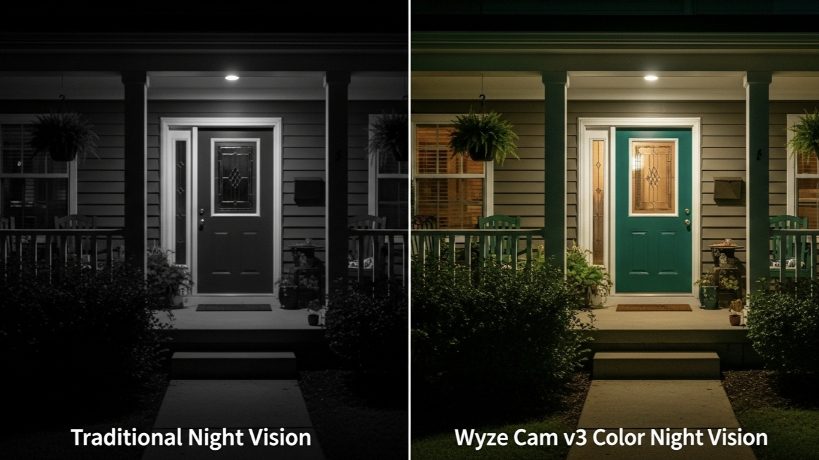
Let’s get straight to the point. The single biggest upgrade and the most stunning feature of the Wyze Cam v3 is its color night vision. This is not a gimmick. It’s a legitimate game-changer in the budget camera space.
Traditional infrared (IR) night vision gives you that murky, black-and-white, ghostly image we’re all used to. The Wyze Cam v3 uses a new, highly sensitive Starlight CMOS sensor that can find color in near-total darkness. In my testing, if there’s even a tiny amount of ambient light—from a single streetlamp or moonlight—the v3 produces a surprisingly clear, full-color image where other cameras would have long since switched to black and white.
For a security camera, context is everything. Being able to tell police that a prowler was wearing a blue jacket, not just a “dark jacket,” is a significant advantage. This feature alone makes the v3 a massive leap forward.
Core Features & Performance: The Good and The Bad
Beyond the night vision, the Wyze Cam v3 packs an impressive feature list for its price point (typically around $30-$35).
What I Love (The “Pros”):
- Indoor/Outdoor Weather Resistance (IP65): This was a huge upgrade from the v2. You can confidently mount this camera outside under an eave without worrying about rain or dust. I’ve had several running outdoors for over two years in harsh weather with zero issues.
- 1080p HD Video Quality: The daytime video is crisp, clear, and more than sufficient for identifying faces and reading license plates at a reasonable distance.
- Local Storage via MicroSD Card: This is a critical feature for privacy and cost-conscious users. You can pop in a microSD card (up to 256GB) and have it record 24/7 or just motion events, completely free of any monthly subscription.
- Two-Way Audio: The microphone and speaker are decent enough to have a quick conversation with a delivery person or warn off an unwanted visitor.
- Smart Detection Features: With the optional Cam Plus subscription, the AI detection for People, Packages, Vehicles, and Pets is surprisingly accurate and helps eliminate false alarms from swaying trees.
What I Don’t Love (The “Cons”):
- It’s a Wi-Fi Camera: Like all cameras in this price range, it relies on a strong 2.4 GHz Wi-Fi signal. If the camera is placed far from your router, you will experience lag or disconnections. A solid home network is a must.
- The Power Cable: While the camera itself is weatherproof, the included USB power adapter is not. If you’re mounting it outside, you must plug it into a weatherproof outdoor outlet cover. The 6-foot cable can also be too short for some placements.
- The Subscription Push: While the camera is fully functional without a subscription (especially with a microSD card), the Wyze app heavily encourages you to sign up for Cam Plus. The free plan only provides still-image snapshots of motion events with a 5-minute cooldown period between them, which can be limiting.
The “Package Protector” Setup
A client, Brian, was having issues with packages being stolen from his front porch. He didn’t want to invest in a full security system, but needed a reliable way to monitor his entryway.
The Problem: A need for clear video evidence and immediate motion alerts, specifically for people and packages, on a tight budget.
My Recommended Solution:
- One Wyze Cam v3 mounted under the eave of his front porch, pointed directly at his doorstep.
- A 32GB microSD card installed for continuous local recording.
- A subscription to Wyze Cam Plus (which is very affordable, around $2/month per camera).
The Result: The setup was a total success. The Cam Plus service provided him with immediate, full-length video alerts to his phone whenever a person or a package was detected, filtering out the noise from cars driving by. The color night vision meant he could clearly see delivery drivers’ uniforms even late at night. The microSD card gave him a 24/7 backup of all footage, just in case. For a total hardware cost of under $50 and a tiny monthly fee, he got a powerful, specialized security solution that solved his exact problem.
Wyze Cam Plus: To Subscribe or Not to Subscribe?
This is the most common question clients ask me. Here’s my professional breakdown:
- Go WITHOUT a subscription if: Your primary need is simple live viewing and you are happy to rely solely on a microSD card for recorded footage. You’re willing to accept the 5-minute cooldown on free cloud alerts.
- You SHOULD subscribe to Cam Plus if:
- You want immediate, full-length video alerts sent to your phone (not just still images).
- You need the intelligent AI detection to filter out non-essential motion.
- You want the convenience of cloud storage without needing to physically remove the microSD card to review footage.
My Verdict: For any security-focused application (like monitoring a porch or driveway), the Cam Plus subscription is a must-have. It transforms the camera from a simple monitoring device into a proactive security tool. For casual indoor use, you can probably skip it.
Final Verdict: Is It Still the Budget King?
After years of real-world use, my answer is a resounding yes. The Wyze Cam v3 remains the undisputed champion of budget security cameras.
While competitors have emerged, none have managed to offer this combination of stellar color night vision, indoor/outdoor versatility, and the flexibility of both local and cloud storage at such an aggressive price point. It’s not a replacement for a high-end, professionally monitored system, but that’s not its purpose.
For the average homeowner looking to add a layer of security, monitor pets, or keep an eye on their property without breaking the bank, the Wyze Cam v3 isn’t just a good choice—it’s the smartest choice you can make.