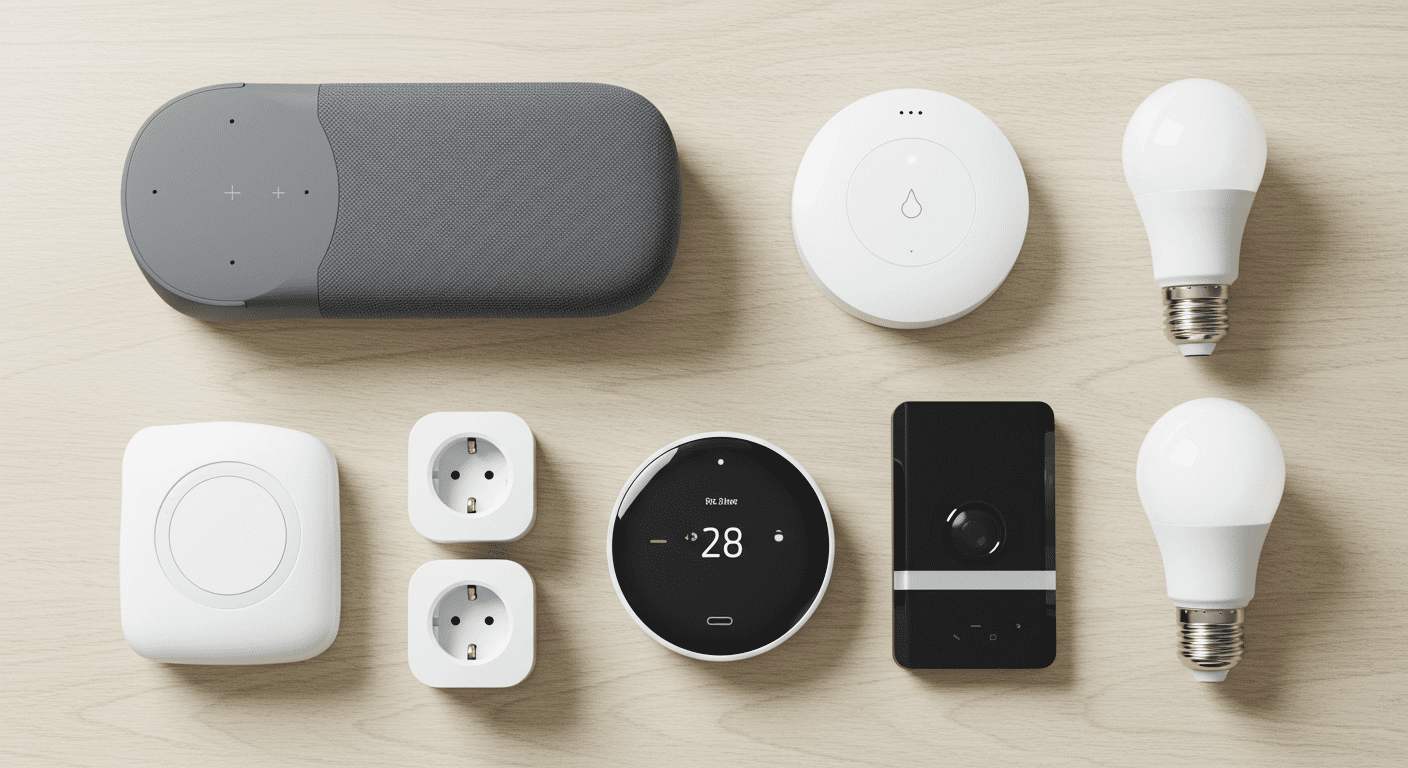
The best smart home devices for beginners are a smart speaker, smart lights, smart plugs, a smart thermostat, and a smart security device. These five devices are easy to set up, affordable, and provide the biggest impact, helping you control your home, automate daily tasks, and improve convenience right away.
Starting a smart home sounds exciting—until you realize how many devices are out there.
Lights, speakers, plugs, cameras… it gets overwhelming fast.
Most beginners make the same mistake. They try to buy everything at once. Then nothing works together the way they expected.
You don’t need a full system to start.
In fact, the smartest way to build a smart home is simple: start with a few essential devices that actually make a difference.
I’ve seen setups where just one smart plug or light changed how someone uses their home daily. The key isn’t buying more—it’s choosing the right devices first.
This guide covers the five must-have smart devices that give you the biggest impact with the least effort.
Let’s start with a quick overview.
What Are the Best Smart Home Devices for Beginners? (Quick Answer)
If you’re just starting, these are the five essential smart home devices you should focus on:
- Smart Speaker: Your main control hub (Alexa or Google)
- Smart Lights: The easiest way to automate your home
- Smart Plugs: Turn regular devices into smart ones
- Smart Thermostat: Improve comfort and save energy
- Smart Security Device: Add basic home monitoring and safety
These devices cover everything you need to start:
- Control → Smart speaker
- Automation → Lights and plugs
- Comfort → Thermostat
- Security → Cameras or doorbells
You don’t need anything more in the beginning.
This setup gives you real functionality without making things complicated.
Next, let’s look at how to choose the right devices before you buy anything.
How to Choose Your First Smart Home Devices
Before buying any smart home device, it’s important to make a few simple decisions. This will save you money, avoid compatibility issues, and make your setup much easier.
Most beginners skip this step—and regret it later.
1. Choose One Ecosystem First
Your smart home needs a central system to control everything.
- Amazon Alexa → best for flexibility and device compatibility
- Google Home → best for voice control and simplicity
- Apple HomeKit → best for privacy and Apple users
Tip: Stick to one ecosystem to avoid connection problems.
2. Start Simple, Not Complex
You don’t need a full smart home setup on day one.
Start with 1–2 devices:
- A smart speaker
- Or a smart light or plug
This helps you understand how everything works before expanding.
3. Focus on Real Use Cases
Don’t buy devices just because they look interesting.
Ask yourself:
- Do I want easier lighting control?
- Do I want to automate daily routines?
- Do I want better home security?
Buy devices that solve a real problem.
4. Check Compatibility Before Buying
Not all devices work with every ecosystem.
This is especially important if you’re using Apple HomeKit.
Tip: Always check if the device supports your platform (Alexa, Google, or HomeKit).
5. Make Sure Your Wi-Fi Is Reliable
Every smart device depends on your internet connection.
- Weak Wi-Fi causes delays
- Devices may disconnect
- Automation may fail
Tip: Ensure strong coverage in every room where you plan to use smart devices.
Once you get these basics right, building your smart home becomes much easier.
Now let’s look at the five devices you should start with—and why they matter.
1. Smart Speaker (Your Control Center)
0
If you’re starting a smart home, this is the first device you should buy.
A smart speaker acts as the control center for your entire setup.
It connects all your devices and lets you control them using your voice or phone.
What It Does
- Controls lights, plugs, and other devices
- Runs automation routines
- Responds to voice commands
- Plays music, news, and more
Popular options include Amazon Echo (Alexa) and Google Nest (Google Assistant).
Why It’s Essential
Without a smart speaker, your devices feel disconnected.
With it, everything works together.
For example:
- “Turn off all lights”
- “Start my morning routine”
- “Set temperature to 72 degrees”
One command can control your entire home.
Real-Life Example
Instead of walking around turning off lights at night, you just say:
“Alexa, good night.”
And everything shuts down automatically.
Beginner Tip
Start with one smart speaker in your main room. You can always add more later.
Bottom line: This is the foundation of your smart home. Everything else connects through it.
Next, let’s look at the easiest upgrade you can make—smart lighting.
2. Smart Lights (The Easiest Upgrade)
0
If you want instant results from your smart home, start with smart lights.
This is the easiest and most noticeable upgrade you can make.
What They Do
- Turn lights on/off using your phone or voice
- Adjust brightness and color
- Automate lighting based on time or routines
You can control your lights without touching a switch.
Why They Matter
Lighting is something you use every day—so automating it has a big impact.
For example:
- Lights turn on automatically when you get home
- Dim lights at night for a relaxed atmosphere
- Turn everything off with one command
It’s simple—but powerful.
Real-Life Example
You walk into your home in the evening, and your lights turn on automatically.
No switches. No effort.
Or you say:
“Turn off all lights.”
And your entire home goes dark instantly.
Cost vs Value
Smart bulbs are relatively affordable and don’t require major setup.
That makes them perfect for beginners.
Beginner Tip
Start with one room—like your bedroom or living room—before expanding.
Bottom line: If you want the fastest and most visible smart home upgrade, this is it.
Next, let’s look at a device most people underestimate—smart plugs.
3. Smart Plugs (Turn Anything Smart)
0
Smart plugs are one of the simplest—and most powerful—ways to upgrade your home.
They let you turn almost any regular device into a smart device.
What They Do
- Control power to devices remotely
- Turn devices on/off with voice commands
- Schedule when devices run
- Add automation to non-smart products
You just plug them into a wall outlet, then plug your device into the smart plug.
Why They Matter
You don’t need to replace everything in your home with expensive smart devices.
Smart plugs let you upgrade what you already own.
For example:
- Turn a regular lamp into a smart light
- Schedule your coffee maker to start in the morning
- Automatically turn off devices at night
This makes them one of the most flexible smart home tools.
Real-Life Example
Imagine waking up and your coffee machine turns on automatically.
Or your bedside lamp turns off without you getting out of bed.
All controlled with a simple plug.
Why Beginners Love Them
They’re affordable, easy to install, and don’t require any technical setup.
You can set one up in minutes.
Beginner Tip
Start by using smart plugs with devices you use daily—like lamps or fans.
Bottom line: Smart plugs are the easiest way to make “dumb” devices smart without replacing them.
Next, let’s look at a device that improves both comfort and energy efficiency—smart thermostats.
4. Smart Thermostat (Comfort + Energy Savings)
0
A smart thermostat takes your home comfort to the next level—while also helping you save money.
It automatically controls your heating and cooling based on your schedule and preferences.
What It Does
- Adjusts temperature automatically
- Learns your daily routine
- Allows remote control from your phone
- Optimizes energy usage
You don’t have to constantly adjust your thermostat anymore.
Why It Matters
Heating and cooling make up a large part of your energy bill.
A smart thermostat reduces waste by only using energy when needed.
For example:
- Lowers temperature when you leave home
- Warms up your home before you wake up
- Adjusts automatically at night
This improves both comfort and efficiency.
Real-Life Example
You leave for work, and your thermostat automatically switches to energy-saving mode.
Before you return, it adjusts back—so your home feels perfect when you walk in.
No manual changes needed.
Cost vs Value
Smart thermostats cost more upfront than other devices—but they can save money over time through lower energy bills.
Beginner Tip
If your home supports it, this is one of the most valuable upgrades you can make after lighting and plugs.
Bottom line: A smart thermostat makes your home more comfortable while reducing energy costs automatically.
Next, let’s look at the final essential device—smart security.
5. Smart Security Device (Peace of Mind)
0
A smart home isn’t just about convenience—it’s also about security.
Smart security devices help you monitor and protect your home, even when you’re not there.
What They Do
- Show live video of your home
- Send alerts when motion is detected
- Allow remote monitoring from your phone
- Let you lock or unlock doors remotely
You can check your home anytime, from anywhere.
Types of Smart Security Devices
- Security cameras: Monitor indoor or outdoor activity
- Video doorbells: See and talk to visitors remotely
- Smart locks: Control access to your home
You don’t need all of them—just one is enough to start.
Why It Matters
This is where smart homes go beyond convenience.
You get awareness and control.
For example:
- Get notified if someone is at your door
- Check your home while traveling
- See what’s happening in real time
This adds a layer of safety that traditional homes don’t have.
Real-Life Example
You’re away from home and get a notification that someone is at your door.
You open your app, see who it is, and even talk to them—without being there.
Beginner Tip
Start with a video doorbell or one indoor camera. Expand later if needed.
Bottom line: Smart security devices give you peace of mind and visibility, no matter where you are.
Now that you know the five essential devices, let’s see how they work together in a real setup.
Best Beginner Smart Home Setup (Simple Example)
Now that you know the five essential devices, the real magic happens when they work together.
You don’t need a complex system. A simple setup can already make your home feel smart.
Morning Routine Example
- Smart lights turn on gradually
- Smart plug starts your coffee machine
- Smart speaker gives weather and news updates
- Thermostat adjusts temperature for comfort
You wake up—and your home is already ready.
Night Routine Example
- Lights dim or turn off automatically
- Smart plugs shut down devices
- Doors lock (if using smart lock)
- Thermostat adjusts for sleeping
All triggered with one command like:
“Good night.”
Away Mode Example
- Lights turn on and off at random times
- Security camera monitors activity
- Smart speaker can simulate presence
This makes your home look occupied—even when you’re not there.
Why This Matters
Individually, each device is useful.
Together, they create a system that saves time, improves comfort, and adds security.
And the best part—you can build this step by step.
Before you start buying, though, there are a few common mistakes you should avoid.
Common Mistakes When Buying Smart Home Devices
Starting a smart home is simple—but making the wrong choices early can cause frustration and wasted money.
Here are the most common mistakes beginners make—and how to avoid them.
1. Buying Too Many Devices at Once
It’s easy to get excited and try to automate everything immediately.
But this often leads to confusion and setup issues.
Fix: Start with 1–2 devices and expand gradually.
2. Mixing Different Ecosystems
Using Alexa, Google Home, and HomeKit together can create compatibility problems.
- Devices may not sync properly
- You end up using multiple apps
- Automation becomes unreliable
Fix: Choose one ecosystem and stick with it.
3. Ignoring Compatibility
Not all smart devices work with every platform.
This is especially important with Apple HomeKit.
Fix: Always check compatibility before buying any device.
4. Weak Wi-Fi Setup
Your smart home depends entirely on your internet connection.
- Weak signals cause delays
- Devices disconnect randomly
- Automation fails
Fix: Ensure strong Wi-Fi coverage throughout your home.
5. Overcomplicating Automation
Complex routines sound powerful—but they often break.
Fix: Keep automation simple at first, then build gradually.
6. Focusing on Features Instead of Use
Some people buy devices based on features they don’t actually need.
Fix: Focus on solving real problems in your daily routine.
Avoid these mistakes, and your smart home setup will be smoother, more reliable, and easier to expand.
Next, let’s look at the cost of starting a smart home so you know what to expect.
How Much Does It Cost to Start a Smart Home?
One of the biggest misconceptions about smart homes is that they’re expensive.
The reality? You can start small—and affordable.
Basic Starter Setup (Budget-Friendly)
- Smart speaker: $30–$60
- Smart bulb: $10–$25
- Smart plug: $10–$20
Total: Around $50–$100
This is enough to build a simple but functional smart home setup.
Mid-Level Setup
- Multiple smart lights
- Additional smart plugs
- Entry-level security camera
Total: Around $150–$300
This setup gives you automation, control, and basic security.
Advanced Setup
- Smart thermostat
- Full lighting setup
- Security system (camera + doorbell)
Total: $300+
This creates a fully connected smart home experience.
Key Takeaway
You don’t need to spend a lot upfront.
Start small. Build over time.
That’s how most successful smart home setups grow.
Frequently Asked Questions
What is the best smart home device to start with?
A smart speaker is the best starting point because it acts as the control center for all other smart devices.
Do I need a hub for smart home devices?
Most modern smart devices don’t require a separate hub. Smart speakers like Alexa or Google Nest act as the central control system.
Are smart home devices expensive?
No, you can start with basic devices like smart bulbs and plugs for under $100 and expand over time.
Which smart home brand is best for beginners?
Amazon Alexa is often the best choice for beginners due to its wide compatibility and ease of use.
Can I install smart home devices myself?
Yes, most smart home devices are designed for easy DIY installation and can be set up in minutes using mobile apps.