In the world of smart displays, two devices consistently rise to the top of the conversation for the best combination of size, features, and price: the Google Nest Hub and the Amazon Echo Show 8. For years, these mid-sized screens have been the de facto command centers for thousands of smart homes. However, with Amazon’s significant overhaul of their device in late 2023, the choice between them has become more nuanced and interesting than ever before.
As a smart home professional, I don’t just read spec sheets; I live with these devices. I install them in my clients’ kitchens, living rooms, and bedrooms, and I see firsthand how they integrate into daily life. This isn’t just a comparison of features; it’s a deep dive into their philosophies, their user experiences, and their ultimate value propositions. You’re not just choosing a screen; you’re choosing a primary interface for your home and a digital assistant to live with. Let’s break down this crucial decision to find the perfect fit for you.
The Tale of the Tape: Comparing the Contenders
To keep things clear, we are specifically comparing the Google Nest Hub (2nd Gen) against the significantly updated Amazon Echo Show 8 (3rd Gen). The updates to the Echo Show 8 make it a vastly different and more powerful competitor than its predecessors.
Design and Display
At first glance, the two devices look similar, but their design philosophies are distinct.
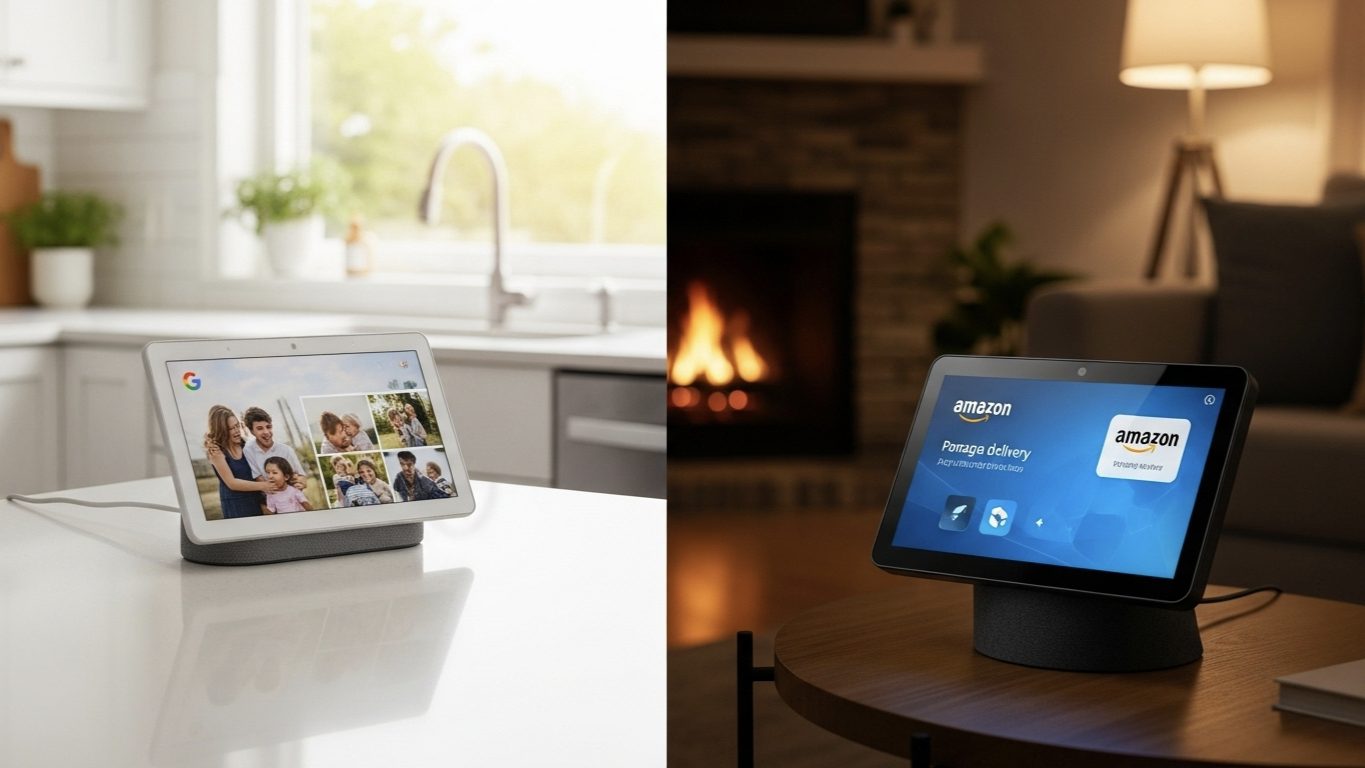
- Google Nest Hub (2nd Gen): The Nest Hub looks like it was designed by a home decor company. It’s soft, covered in fabric, and features a 7-inch “floating” display with a significant bezel. Its primary goal is to blend in, to be an ambient part of the room. The screen resolution is lower (1024×600), but its killer feature is the ambient EQ sensor, which adjusts both the brightness and, crucially, the color temperature to match the room’s lighting. This makes the Nest Hub the undisputed champion of digital photo frames; photos displayed on it look like they are actual printed pictures under glass, not glowing screens.
- Amazon Echo Show 8 (3rd Gen): The new Echo Show 8 looks like a modern, premium piece of tech. It boasts a sleek, edge-to-edge glass front on its 8-inch screen, which has a higher resolution (1280×800). The display is sharper and more vibrant for watching videos. It feels less like a piece of decor and more like a dedicated media tablet, which may be exactly what some users prefer.
My Expert Take: If your primary use case is a digital photo frame that seamlessly blends into a room, the Nest Hub’s ambient display technology is magical. If you plan to watch a lot of videos and want a sharper, more modern-looking device, the Echo Show 8 has the superior screen hardware.
Audio Performance
This category was once a close race, but the latest generation has created a clear winner.
- Google Nest Hub (2nd Gen): The audio on the Nest Hub is perfectly adequate for listening to podcasts, news briefings, or background music. It has a single full-range speaker that provides surprisingly decent bass for its size. It’s clear and gets loud enough for a bedroom or small office, but it won’t be the life of a party.
- Amazon Echo Show 8 (3rd Gen): Amazon made massive improvements here. The 3rd Gen model features stereo speakers and new “spatial audio” processing. The difference is immediately noticeable. The sound is fuller, wider, and has a much more commanding presence. Music has better separation and bass, making it a genuinely good smart speaker for a kitchen or living room. It’s one of the best-sounding smart displays in this size class.
My Expert Take: For casual listening, the Nest Hub is fine. For anyone who wants their smart display to double as a primary music-playing device for a room, the Echo Show 8 is leagues ahead.
Camera and Video Calling
This is the most straightforward comparison, as it’s a story of “have” versus “have-not.”
- Google Nest Hub (2nd Gen): It has no camera. This is a deliberate design choice. For users who are putting a device on their bedside table and are deeply concerned about privacy, this is a massive feature. The lack of a camera means it’s impossible for it to be used for video calls.
- Amazon Echo Show 8 (3rd Gen): It features a high-quality, centered 13MP camera with auto-framing. This means during a video call on Amazon Chime or Zoom, the camera will digitally pan and zoom to keep you perfectly in the frame as you move around. This makes it an exceptional device for video calling relatives while you’re busy cooking in the kitchen. It also includes a physical privacy shutter that covers the lens.
My Expert Take: The choice is binary. If you want to make video calls from your display, the Echo Show 8 is your only option here, and it’s a great one. If you want a 100% guarantee of privacy in a sensitive location like a bedroom, the camera-less Nest Hub is the clear winner.
The Kitchen Hub vs. The Bedside Companion
I recently worked with two different clients whose needs perfectly highlighted the strengths of each device.
Client A (The Busy Family): This family needed a central command center for their chaotic kitchen. They are Prime members and their kids love to call their grandparents. Their primary uses were watching Prime Video while cooking, adding items to a shared shopping list via voice, and making frequent “Drop In” video calls to the playroom to tell the kids dinner is ready. For them, the Amazon Echo Show 8 was the perfect fit. The loud speakers, excellent video calling camera, and deep integration with Amazon services made it the ideal kitchen workhorse.
Client B (The Privacy-Conscious Individual): This client wanted to modernize their bedroom. They wanted a smart alarm clock, a way to listen to calming sounds at night, and a beautiful way to display their travel photos. They were extremely wary of having a camera by their bed. The Google Nest Hub was the immediate and obvious choice. Its camera-less design gave them peace of mind. The “Sunrise Alarm” feature gently woke them up, the stunning Google Photos display was a constant joy, and the unique Sleep Sensing feature provided insights into their sleep quality without requiring them to wear a watch to bed.
These two scenarios show that the “best” device is entirely dependent on the room it’s in and the problem it’s intended to solve.
Unique Features & Smart Home Control
Beyond the basics, each device has a unique trick up its sleeve and a different approach to being your smart home’s brain.
- Google Nest Hub (2nd Gen): Its standout feature is the built-in Soli radar chip. This enables two things: “Quick Gestures,” allowing you to pause music by holding up your hand, and “Sleep Sensing,” which tracks your sleep patterns and breathing contact-free. As a smart home hub, it’s a `Matter` controller and a Thread border router, making it great for controlling modern devices. However, it lacks a Zigbee radio.
- Amazon Echo Show 8 (3rd Gen): Its standout feature is its role as a complete smart home hub. It is a `Matter` controller, a Thread border router, AND has a built-in Zigbee radio. This means it can directly connect to and control older Zigbee devices (like many first-generation Philips Hue bulbs or sensors) without needing a separate, dedicated hub from that manufacturer. This is a significant advantage for anyone with existing Zigbee devices. Its “Adaptive Content” feature also changes the screen information based on your proximity, showing more detail as you get closer.
My Expert Take: The Nest Hub’s Soli radar is a genuinely cool piece of tech, especially for the bedroom. However, the Echo Show 8’s inclusion of a Zigbee radio makes it a more powerful and versatile all-in-one hub for a diverse smart home that includes both old and new devices.
Which One Should I Actually Buy?
After all the technical details, the decision comes down to how you see yourself using it. Ask yourself these questions:
- What is its primary room and function? For a kitchen or living room where media and communication are key, the Echo Show 8’s superior speakers and camera give it the edge. For a bedroom or office where ambient display and privacy are paramount, the Nest Hub is the better choice.
- Which digital assistant and ecosystem do you prefer? Are you deeply integrated with Google services (Photos, Calendar, YouTube)? The Nest Hub will feel like a natural extension of your digital life. Are you an Amazon Prime member who uses shopping lists and wants the widest possible device compatibility? Alexa is your best bet.
- Do you have older Zigbee devices? If you have existing Zigbee sensors or lights and want to simplify your setup by removing extra hubs, the Echo Show 8’s built-in Zigbee radio is a killer feature.
My Pro Tip: If you’re still undecided, focus on the user interface. The Nest Hub offers a clean, calm, ad-free experience centered on your photos and information. The Echo Show is a more active, bustling interface with more content suggestions, news headlines, and shopping integration. Which “personality” would you rather have in your home?
Conclusion: Two Excellent Choices for Two Different Users
In today’s smart home, there is no longer a single “best” smart display. Instead, we have two highly polished, excellent devices that cater to different priorities. The choice has become clearer than ever.
The Amazon Echo Show 8 (3rd Gen) has established itself as the all-around media and connectivity powerhouse. With its superior sound, excellent camera, and all-in-one hub capabilities, it’s the best choice for a central, active room in the house.
The Google Nest Hub (2nd Gen) has solidified its position as the ultimate ambient and personal companion. With its unmatched digital photo frame quality, unique sleep tracking, and camera-less design, it is the perfect, private device for your most personal spaces, like the nightstand or a quiet office desk.
By identifying your primary need—a public media hub or a private ambient companion—you can make your choice with confidence, knowing you’re getting a best-in-class device either way.