One of the most fundamental questions I help clients navigate is, “Do I actually need another box? Do I need a smart hub?” It’s a fantastic question. With so many devices connecting directly to Wi-Fi and being controllable through Alexa or Google Home, the role of a dedicated hub like Hubitat or Aeotec SmartThings can seem confusing or even redundant.
The truth is, for many people just starting out, you don’t need a dedicated hub. But there is a distinct point in every smart home journey where the limitations of a simple Wi-Fi-based system become apparent. At that point, a dedicated hub transitions from a “nice to have” to a “must-have” for anyone serious about reliability, speed, and true automation.
In this guide, I’ll break down the crucial differences between a hub-less and a hub-based system, explain the unique problems that hubs solve, and help you decide if it’s the right time for you to make the leap.
The Hub-less World: Wi-Fi, the Cloud, and Its Limitations
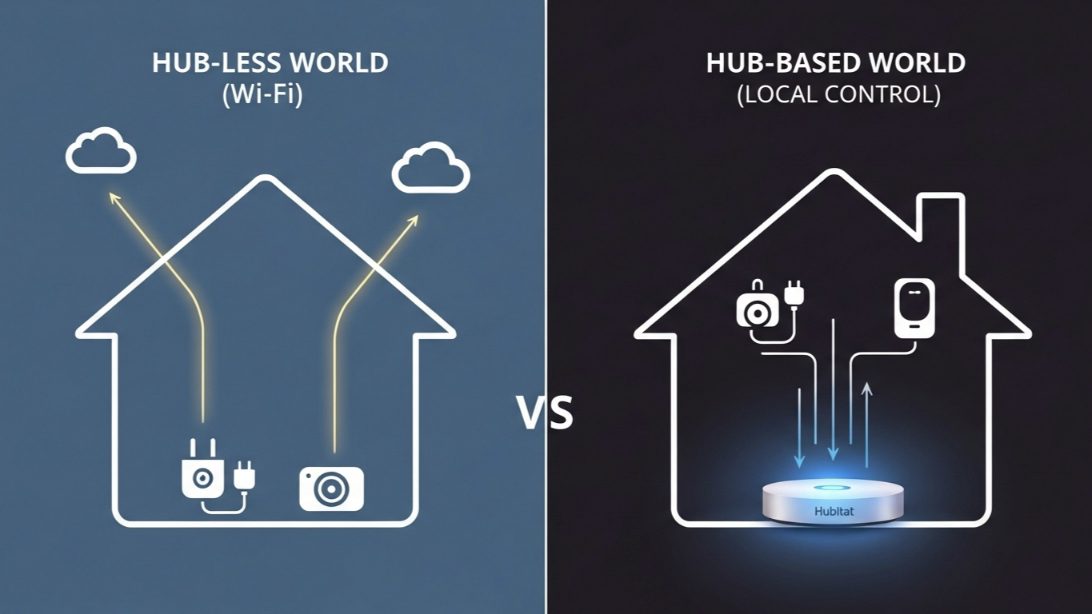
When you buy a Wi-Fi smart plug or light bulb, the setup is simple. You connect it directly to your home’s Wi-Fi network. When you give a command through an app or a voice assistant, here’s what happens:
Your Command -> Your Router -> The Internet (The “Cloud”) -> The Device Manufacturer’s Server -> The Internet -> Your Router -> Your Device
This system is easy and works well for a few devices. But as your smart home grows, you’ll encounter three major limitations:
- Network Congestion: Every single Wi-Fi device is another client competing for airtime on your router. A dozen is fine. Fifty can lead to slowdowns and instability, especially on a basic router.
- Cloud Dependency: If your internet connection goes down, your smart home stops working. You can’t even turn on a light with a voice command because the command can’t make the round trip to the cloud and back.
- Limited Automation (“The Walled Gardens”): While Alexa and Google are great, they can’t create truly complex, multi-layered automations. They often struggle to get devices from competing brands to work together seamlessly.
The Hub-Based World: Enter Zigbee, Z-Wave, and Local Control
A dedicated smart hub like Hubitat Elevation or Aeotec SmartThings acts as a local traffic controller and translator for your smart home. These hubs have special radios built-in that can speak protocols other than Wi-Fi, primarily Zigbee and Z-Wave.
Devices that use Zigbee or Z-Wave (like Philips Hue bulbs, many motion sensors, smart locks, and water leak sensors) don’t connect to your Wi-Fi router. Instead, they connect directly to your hub, creating their own robust, low-power mesh network.
Now, when you give a command, here’s what happens:
Your Command -> Your Hub -> Your Device
Notice what’s missing? The internet. This leads to three profound advantages.
Advantage 1: Incredible Speed and Reliability
Because the command travels only within your own home, the response is nearly instantaneous. There’s no lag waiting for a round trip to the cloud. This is especially noticeable with motion-activated lighting. With a hub, the light turns on the moment you enter the room. With a cloud-based system, there can be a frustrating 1-2 second delay.
Advantage 2: Local Control (Your Home Works When the Internet Doesn’t)
This is the killer feature. With a hub like Hubitat that prioritizes local processing, all your core automations—your motion-activated lights, your time-based schedules, your security alerts—continue to run perfectly even if your internet service is completely down. Your home’s “brain” is inside your house, not in a server farm a thousand miles away.
Advantage 3: Unmatched Automation Power
Hubs are built for power users. Their automation engines (like Hubitat’s “Rule Machine”) allow for incredibly complex and layered logic that is simply impossible with Alexa or Google alone. You can create rules with multiple conditions (IF THIS and THIS, but not THAT) that trigger intricate scenes. For example: “IF the front door unlocks, AND it’s after sunset, AND my phone is present, THEN set the entryway lights to 50%, the thermostat to 70 degrees, and announce ‘Welcome home’ on the kitchen speaker.”
The “Laggy” Hallway Light
A client, Tom, was getting increasingly frustrated with his smart home. He had set up a Wi-Fi motion sensor and a Wi-Fi smart bulb in his hallway. His goal was simple: when he walked into the hall at night, the light should turn on.
The Problem: The system worked, but there was a consistent 2-3 second delay. He would be halfway down the hall before the light actually turned on. The delay was caused by the “cloud-hop” journey: Motion Detected -> Router -> Internet -> Sensor’s Cloud -> IFTTT Cloud -> Bulb’s Cloud -> Internet -> Router -> Bulb On.
The Solution: The fix was to take the cloud out of the equation.
- We installed a Hubitat Elevation hub.
- We replaced his Wi-Fi motion sensor with a Zigbee-based Aqara motion sensor.
- We replaced his Wi-Fi bulb with a Zigbee-based Sengled smart bulb.
Both new devices paired directly to the Hubitat hub. We recreated the automation directly on the hub.
The Result: The response was instantaneous. The moment he stepped into the hallway, the light was on before his foot even hit the floor. The command’s journey was now just: Motion Detected -> Hub -> Bulb On. By moving to a hub-based system, we solved a problem that no Wi-Fi upgrade could ever fix. This demonstrates that for time-sensitive automations like motion lighting, a hub is the only way to achieve a truly seamless experience.
So, Do YOU Need a Hub? A Simple Checklist
Answer these questions to decide:
- How many devices do you have? If you have more than 20-30 smart devices, a hub will help offload traffic from your Wi-Fi and improve overall stability.
- Is speed critical? For things like motion-activated lights or security sensors, a hub’s local processing provides the instant response you need.
- Do you want your home to work without internet? If local control during an outage is important to you, a hub (especially Hubitat) is essential.
- Do you want to create complex automations? If you find yourself saying, “I wish I could make a rule that does X, but only if Y is also happening,” you have outgrown basic routines and need the power of a hub.
My Professional Recommendation:
- You DON’T need a hub if: You have fewer than 20 devices, you’re happy with basic voice commands and simple schedules, and a slight delay is acceptable.
- You SHOULD get a hub if: You prioritize speed, you want rock-solid reliability, you want local control, or you are an enthusiast who wants to unlock the true creative potential of home automation.
My Final Verdict: The Path to a Truly Smart Home
Starting with Wi-Fi devices and a voice assistant is the perfect entry point into the smart home world. But as your ambitions grow, you’ll find that a dedicated smart hub is the logical next step. It’s the key that unlocks a faster, more reliable, and infinitely more powerful smart home experience. It’s the difference between a home with a few smart gadgets and a home that is truly, intelligently, automated.