Yes, some smart home devices that work without Wi-Fi. Devices that use Bluetooth, Zigbee, Z-Wave, or local smart hubs can continue working without a Wi-Fi connection. However, cloud-based features like remote control, app access, and some voice assistant functions may stop working without internet access.
Most people assume “smart home” automatically means “always connected to Wi-Fi.”
That’s not entirely true.
Some smart devices work perfectly well without Wi-Fi.
Others only appear smart until your internet goes down.
This is where a lot of confusion happens.
Because “no Wi-Fi” can mean different things:
- no internet connection
- no wireless router
- local-only smart control
- offline automation
And those differences matter.
If you want a smart home that works during outages, in old houses, in cabins, or with better privacy, choosing the right devices is critical.
This guide explains which smart home devices actually work without Wi-Fi—and what limitations you should expect.
Can Smart Home Devices That Work Without Wi-Fi?
Yes—but it depends on how the device is designed.
This is where many people get confused.
“Without Wi-Fi” does not always mean the same thing as “without internet.”
And that difference matters a lot.
Scenario 1: No Wi-Fi, But Local Device Communication Exists
Some smart devices communicate locally instead of relying on your Wi-Fi network.
Examples:
- Bluetooth smart devices
- Zigbee smart devices
- Z-Wave smart devices
- hub-based automation systems
These can often continue working even if Wi-Fi is unavailable.
Scenario 2: Wi-Fi Exists, But Internet Is Down
This is different.
Your router may still be working—but your internet provider is offline.
In this case:
- local smart automation may still work
- hub-based controls may still work
- Bluetooth devices may still work
But cloud-based features often stop.
Examples:
- remote app access
- cloud voice assistant features
- internet notifications
Scenario 3: Cloud-Only Smart Devices
Some “smart” devices depend almost entirely on internet/cloud communication.
If Wi-Fi or internet disappears, they lose much of their functionality.
Examples may include:
- some cheap Wi-Fi smart plugs
- cloud-dependent cameras
- internet-reliant voice assistants
The Simple Rule
Devices with local control = more reliable offline.
Devices that depend on cloud apps = less reliable offline.
Best Practical Advice
If offline reliability matters to you, look for:
- Bluetooth devices
- Zigbee products
- Z-Wave devices
- local smart hubs
Next, let’s look at exactly how smart devices work without Wi-Fi in the first place.
How Smart Devices Work Without Wi-Fi
Smart devices can work without Wi-Fi because not all smart home communication depends on your wireless internet network.
Some devices communicate locally instead.
That’s the key difference.
Here are the main technologies that make offline smart homes possible.
1. Bluetooth Smart Devices
Bluetooth devices communicate directly with your phone, tablet, or nearby controller.
No Wi-Fi router required.
This makes Bluetooth ideal for:
- smart locks
- smart bulbs
- small local automation devices
Pros:
- simple setup
- works without internet
- direct local control
Limitations:
- short range
- limited whole-home coverage
2. Zigbee Smart Devices
Zigbee is one of the best smart home technologies for local control.
Instead of using Wi-Fi, Zigbee devices communicate through a low-power mesh network.
That means devices can pass signals between each other.
Benefits:
- excellent reliability
- lower power usage
- better whole-home coverage with enough devices
- local automation potential
Usually, Zigbee requires a compatible hub.
3. Z-Wave Devices
Z-Wave works similarly to Zigbee.
It uses local mesh communication instead of depending on your Wi-Fi network.
Strong advantages include:
- stable local automation
- good device interoperability
- reliable offline control
Like Zigbee, a hub is usually required.
4. Local Smart Hubs
This is where smart homes become truly resilient.
A local hub can manage devices without cloud dependence.
Examples of what hubs can coordinate:
- lights
- sensors
- smart plugs
- motion-triggered routines
- door sensors
If internet goes down, local automation may continue working normally.
5. Cloud-Based Wi-Fi Devices (The Weak Point)
Some Wi-Fi smart devices rely heavily on cloud servers.
These often stop working properly without connectivity.
Typical failures include:
- remote control loss
- voice assistant failures
- missed notifications
- automation breakdowns
The Best Practical Rule
For maximum offline reliability:
- Bluetooth = simple local control
- Zigbee/Z-Wave = stronger whole-home automation
- Local hubs = best resilience
Now let’s look at actual smart devices that still work without Wi-Fi.
1. Bluetooth Smart Bulbs (Simple Local Lighting)
If you want smart lighting without depending on Wi-Fi, Bluetooth smart bulbs are one of the easiest options.
They communicate directly with your phone instead of needing a wireless router.
How They Work
Bluetooth smart bulbs connect locally through short-range wireless communication.
This means:
- no Wi-Fi router required
- no internet connection required for local control
- direct phone-to-device communication
What You Can Do
- turn lights on/off
- adjust brightness
- change colors (if supported)
- create basic local scenes
Why They’re Worth It
They’re one of the simplest “offline smart home” upgrades.
Perfect for:
- apartments
- bedrooms
- cabins
- old homes with poor Wi-Fi
Limitations
Bluetooth has shorter range than Wi-Fi.
That means:
- whole-home control is limited
- remote access usually won’t work
- automation options may be simpler
Best For
- simple local lighting control
- privacy-focused users
- small offline smart setups
Bottom line: Bluetooth smart bulbs are one of the easiest truly Wi-Fi-free smart home devices.
But if you want stronger whole-home reliability, Zigbee gets even better.
2. Zigbee Smart Bulbs (Better Whole-Home Lighting)
If Bluetooth bulbs are the simple offline option, Zigbee bulbs are the serious smart home upgrade.
Zigbee is one of the best technologies for smart homes that don’t rely heavily on Wi-Fi.
How They Work
Zigbee devices communicate through a low-power mesh network.
Instead of talking directly to Wi-Fi, devices communicate through a hub and often through each other.
This improves reliability dramatically.
What You Can Do
- lighting automation
- motion-triggered lighting
- scene control
- hub-based routines
- whole-home lighting coordination
Why They’re Worth It
Zigbee works especially well when:
- Wi-Fi is unreliable
- you want local automation
- you care about privacy
- you need better coverage in larger homes
Major Advantage
Because Zigbee forms a mesh network, signal reliability often improves as you add devices.
That makes it much stronger than Bluetooth for larger smart homes.
Limitations
Zigbee usually requires a compatible hub.
That adds complexity—but also much more power.
Best For
- whole-home offline smart lighting
- local automation setups
- reliable smart homes without cloud dependence
Bottom line: If you want offline smart lighting done properly, Zigbee is one of the strongest choices available.
Next, let’s look at smart plugs that still work without relying entirely on Wi-Fi.
3. Smart Plugs with Hub Control (Offline Automation)
Most cheap Wi-Fi smart plugs stop being useful when internet access disappears.
But hub-based smart plugs are different.
Zigbee or Z-Wave smart plugs can continue working locally through a compatible smart hub.
How They Work
Instead of depending on cloud apps, these plugs communicate through your local automation system.
That means they can keep functioning even when internet connectivity is unavailable.
What You Can Do
- turn lamps on/off
- schedule appliances
- trigger routines from sensors
- automate fans or coffee makers
- create local scenes
Why They’re Worth It
Smart plugs are one of the highest-value smart home devices.
And when hub-controlled, they become much more reliable than cheap cloud-dependent alternatives.
Perfect for:
- privacy-focused smart homes
- internet outage resilience
- older homes with unreliable connectivity
Limitations
- requires compatible hub
- remote internet access may still disappear
- some app integrations vary
Best For
- local automation
- reliable offline routines
- budget smart home upgrades
Bottom line: If you want smart plugs that remain useful without cloud dependence, hub-based models are dramatically better.
Next, let’s look at one of the most practical offline smart devices—smart locks.
4. Bluetooth Smart Locks (Offline Keyless Entry)
Smart locks are one of the best examples of smart devices that do not require Wi-Fi to remain useful.
Many Bluetooth-enabled locks work entirely through local communication.
How They Work
Instead of cloud dependence, Bluetooth smart locks communicate directly with:
- your phone
- a local keypad
- authorized nearby devices
This allows offline access control.
What You Can Do
- lock/unlock doors locally
- use app-based nearby control
- keyless entry
- temporary access codes (depending on model)
Why They’re Worth It
Even without internet, a smart lock still solves real problems.
Examples:
- no physical key needed
- easy access management
- convenient entry for family members
Limitations
Without Wi-Fi or internet:
- remote unlocking may not work
- cloud notifications may stop
- some integrations disappear
But local access remains the real value.
Best For
- privacy-focused homes
- cabins
- older homes
- reliable local access control
Bottom line: Bluetooth smart locks remain genuinely useful even without internet connectivity.
Next, we move into offline automation triggers—motion sensors.
5. Zigbee Motion Sensors (Offline Automation Triggers)
If smart lighting is useful, motion-triggered automation is where a smart home starts feeling truly intelligent.
Zigbee motion sensors are one of the best offline-friendly smart home devices because they can trigger local automations without relying on cloud internet services.
How They Work
These sensors detect movement and send signals through your Zigbee mesh network to a compatible smart hub.
No Wi-Fi dependence required.
No cloud processing required for local routines.
What You Can Do
- turn hallway lights on automatically
- trigger bathroom night lighting
- activate local routines
- create occupancy-based automations
- trigger security alerts locally
Why They’re Worth It
Unlike manual control, motion automation removes friction entirely.
Your home reacts automatically.
Examples:
- walk into a hallway → lights turn on
- enter a room → lighting scene activates
- motion detected while away → local alert logic triggers
Major Advantage
Because Zigbee communication is local, these automations can continue even if internet access disappears.
That’s dramatically better than cloud-dependent motion systems.
Limitations
- requires compatible Zigbee hub
- remote cloud notifications may depend on internet
- setup is more advanced than simple Wi-Fi devices
Best For
- offline automation enthusiasts
- privacy-focused homes
- reliable local routines
- smart homes with poor internet reliability
Bottom line: Zigbee motion sensors unlock real offline automation—not just remote control gimmicks.
Next, let’s look at one of the simplest but most useful offline smart tools: smart buttons.
6. Smart Buttons / Scene Controllers (One-Touch Local Control)
Not every smart home interaction needs an app or voice assistant.
Sometimes the fastest solution is simply pressing a button.
Smart buttons and scene controllers are excellent offline-friendly smart devices because many work entirely through local hub communication.
How They Work
These devices trigger pre-configured actions locally.
Examples:
- turn off all lights
- activate movie mode
- start bedtime routines
- trigger smart plug actions
No internet required if your automation system is local.
Why They’re Worth It
Voice assistants are convenient—but cloud dependence can become a weakness.
Buttons are simple, instant, and reliable.
Examples:
- bedside “good night” button
- front door “away mode” trigger
- living room scene controller
Major Advantage
Local scene controllers avoid cloud delays and internet failures entirely.
They’re often faster than app-based control.
Limitations
- usually requires local hub ecosystem
- less flexible than full app interfaces
Best For
- privacy-focused users
- offline-first smart homes
- quick local automation control
- simple household usability
Bottom line: Smart buttons are one of the most underrated offline smart home upgrades.
Next, we move into another practical offline-capable category—smart thermostats.
7. Local Smart Thermostats (Offline Climate Control)
Many people assume smart thermostats stop being useful without Wi-Fi.
That’s only partially true.
Some smart thermostats can continue performing core climate control functions locally—even when internet access disappears.
How They Work
A thermostat’s primary job is controlling your HVAC system locally.
That means scheduled temperature control can often continue even if cloud services fail.
Depending on the model, you may still have:
- manual temperature control
- local scheduling
- basic automation
- HVAC operation without internet
Why They’re Worth It
Climate control is one of the most practical smart home upgrades.
And unlike cloud-only gadgets, many thermostats still retain meaningful functionality offline.
Examples:
- scheduled heating continues
- cooling automation remains active
- manual adjustments still work locally
What Usually Stops Working
Without internet, cloud-connected features often disappear.
Examples:
- remote app control
- internet weather optimization
- cloud notifications
- voice assistant integrations
But core thermostat functionality often survives.
Limitations
- depends heavily on device model
- HVAC compatibility matters
- cloud-heavy brands vary significantly
Best For
- practical offline resilience
- energy-conscious users
- homes where internet outages happen
Bottom line: Smart thermostats may lose cloud convenience without internet—but many remain genuinely useful locally.
Next, let’s look at smart security devices that can work without depending entirely on cloud subscriptions.
8. Video Doorbells with Local Storage (Offline-Friendly Security)
Most cloud-based video doorbells depend heavily on internet access.
But some smarter options support local recording and reduced cloud dependence.
That makes them better choices for privacy-focused or offline-capable smart homes.
How They Work
Instead of sending everything to remote cloud servers, these systems may use:
- local SD card storage
- local hub recording
- network video recorder (NVR) support
This reduces cloud dependence significantly.
Why They’re Worth It
Even if internet access fails, some local functionality may continue.
Potential benefits:
- local recording
- motion capture
- on-site video storage
- better privacy control
Important Reality Check
Video doorbells vary dramatically.
Without internet, many features may stop:
- remote phone alerts
- live remote viewing
- cloud event history
- voice assistant integrations
This category requires careful product selection.
Best For
- privacy-conscious users
- reduced cloud dependence
- local-first smart security setups
Bottom line: Some video doorbells remain partially useful without internet—but cloud-heavy models may lose major functionality.
Next, we move into one of the most reliable offline security upgrades: local sensors.
9. Hub-Based Security Sensors (Reliable Offline Monitoring)
If you want smart security without depending entirely on cloud apps, hub-based sensors are one of the best solutions.
These include:
- door sensors
- window sensors
- motion sensors
- occupancy sensors
- leak sensors
When connected through a local hub, they can continue functioning even if internet access disappears.
How They Work
These sensors communicate locally using protocols like:
- Zigbee
- Z-Wave
Instead of sending everything to cloud servers, they talk directly to your local smart home controller.
What You Can Do
- detect opened doors/windows
- trigger local alarms
- activate smart lighting automations
- create security routines
- trigger local notifications (system dependent)
Why They’re Worth It
Cloud security can be convenient—but local systems are often more resilient.
Examples:
- door opens → hallway lights activate
- window sensor triggers automation
- motion event launches local scene
This continues even when internet-based services fail.
Limitations
Without internet:
- remote phone alerts may stop
- cloud dashboards may disappear
- remote access may be limited
But local functionality often remains excellent.
Best For
- privacy-focused smart homes
- reliable local security automation
- old homes
- internet outage resilience
Bottom line: Hub-based sensors are one of the most reliable offline-capable smart home categories.
Now let’s look at the most powerful offline smart home option of all.
10. Full Local Smart Home Hub (Best Offline Smart Home Option)
If you want a smart home that keeps working even when the internet goes down, this is the gold standard.
A full local smart home hub gives you maximum offline control.
What It Is
A local hub acts as the brain of your smart home.
Instead of depending on remote cloud servers, automation runs locally inside your home.
This can coordinate:
- lights
- smart plugs
- sensors
- motion automations
- buttons
- thermostats
- locks
Why It’s Powerful
Internet outages don’t automatically break your automations.
That’s a huge advantage.
Examples:
- motion-triggered lighting still works
- door sensors still trigger routines
- smart buttons still launch scenes
- offline automations remain active
Best Technologies
Local hubs commonly support:
- Zigbee
- Z-Wave
- Bluetooth integrations
- LAN-connected smart devices
Trade-Offs
This is more advanced than buying simple Wi-Fi gadgets.
You may need:
- initial setup time
- device compatibility planning
- basic technical confidence
But the payoff is dramatically better reliability and privacy.
Best For
- privacy-focused users
- power users
- off-grid smart homes
- rural homes
- serious automation setups
Bottom line: If offline reliability matters most, local smart hubs are the strongest solution available.
Now let’s be honest about what stops working without Wi-Fi.
What Stops Working Without Wi-Fi?
Not everything in a smart home keeps working when Wi-Fi or internet disappears.
This is where realistic expectations matter.
Some devices remain highly functional offline.
Others lose major features instantly.
1. Remote App Control
One of the first things that usually stops working is remote access.
If your phone is outside your local network, cloud access is often required.
Without internet:
- remote light control may fail
- remote lock management may disappear
- camera access from outside the home may stop
2. Voice Assistants (Major Limitation)
This surprises many users.
Cloud-based voice assistants often depend heavily on internet access.
Without connectivity:
- Alexa may lose many voice features
- Google Assistant cloud commands may fail
- internet-based routines may stop
Some limited local voice functionality may exist depending on ecosystem—but cloud dependence remains significant.
3. Push Notifications
Smart security alerts usually depend on internet delivery.
Without internet:
- camera alerts may fail
- door sensor notifications may disappear
- motion notifications may stop
Local automation can still work—but remote awareness becomes limited.
4. Cloud Video Storage
Cloud-based cameras and doorbells may lose major functionality.
Examples:
- cloud recordings stop uploading
- remote event playback disappears
- cloud history becomes unavailable
Local storage systems are much more resilient here.
5. Internet-Based Automations
Some automation platforms rely on cloud logic.
Without internet:
- cloud scenes may fail
- third-party integrations may break
- web-triggered automations stop
Local automations usually survive much better.
What Usually Still Works
Offline-friendly systems often keep core local functionality:
- hub-based lighting automation
- Zigbee/Z-Wave routines
- Bluetooth local control
- manual thermostat operation
- local scene buttons
- local security logic
The Real Rule
Cloud convenience disappears first. Local control survives best.
Now let’s build a practical smart home setup designed specifically to work without Wi-Fi dependence.
Best Smart Home Setup Without Wi-Fi (Practical Example)
Let’s make this real.
If you wanted a smart home that still works even when internet access fails, what would that actually look like?
Here’s a practical offline-friendly setup.
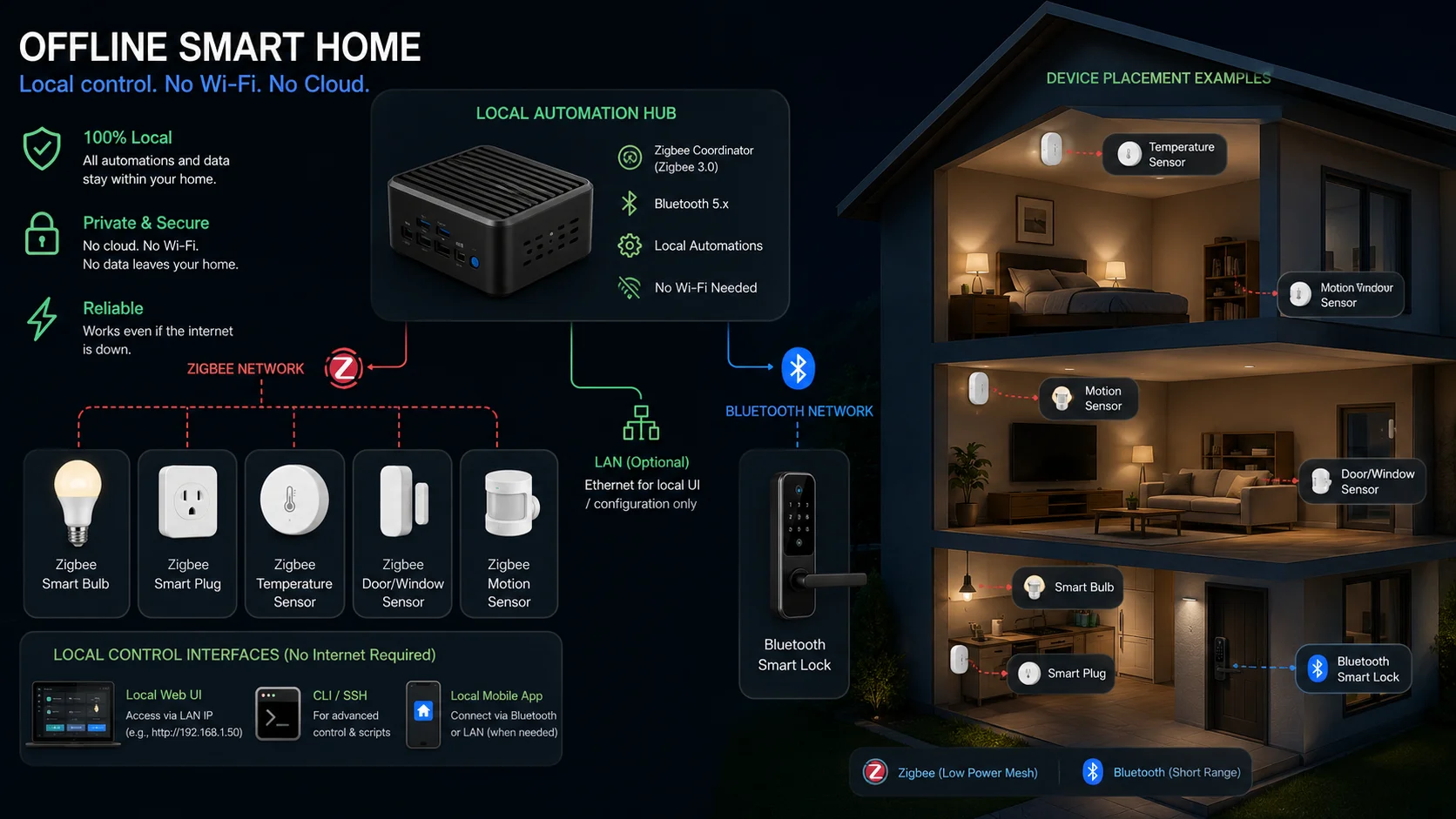
Example: Privacy-Focused Smart Home Without Wi-Fi Dependence
- Local smart home hub → automation brain
- Zigbee smart bulbs → reliable local lighting
- Zigbee motion sensors → automatic lighting triggers
- hub-based smart plugs → local appliance control
- Bluetooth smart lock → local keyless access
- door/window sensors → local security automation
- scene button controller → one-touch routines
- local-friendly thermostat → climate scheduling
This setup avoids heavy cloud dependence.
That’s the key.
What This Setup Can Actually Do
Morning Routine
- motion sensor detects movement
- hallway lights turn on automatically
- coffee maker powers on via smart plug
- thermostat shifts to daytime temperature
Leaving Home
- one button activates away mode
- lights turn off
- selected plugs shut down
- security routines activate
Night Routine
- bedside scene button triggers sleep mode
- lights dim
- doors confirm secure state
- overnight automation remains active
What Still Won’t Work Perfectly
Even in this setup, some cloud conveniences may be unavailable without internet:
- remote phone access
- internet voice assistants
- cloud notifications
- off-site camera access
But local automation remains strong.
Who This Setup Is Perfect For
- privacy-conscious users
- old houses with poor Wi-Fi
- cabins
- rural homes
- internet outage resilience
- off-grid smart home enthusiasts
Bottom Line
A smart home without Wi-Fi isn’t about copying cloud-based smart homes.
It’s about building a system designed for local control from the start.
Now let’s look at who should actually consider this kind of setup.
Who Should Build a Smart Home Without Wi-Fi?
A Wi-Fi-dependent smart home works fine for many people.
But for some users, an offline-friendly smart home is actually the better choice.
Here’s who benefits most.
1. Privacy-Focused Users
If you dislike cloud-connected devices constantly sending data to remote servers, local smart homes are far more appealing.
Benefits include:
- less cloud dependence
- more local control
- better privacy posture
- reduced third-party reliance
This is one of the biggest reasons advanced users choose local automation systems.
2. People in Areas with Unreliable Internet
If your internet goes down often, cloud smart homes become frustrating fast.
Examples:
- rural homes
- remote properties
- older neighborhoods
- unstable ISP coverage areas
Offline-capable devices keep working when connectivity becomes unreliable.
3. Old House Owners
Older homes often struggle with:
- weak Wi-Fi coverage
- thick walls
- awkward layouts
Local smart technologies like Zigbee often perform better than cloud-heavy Wi-Fi gadgets in these environments.
This makes offline smart setups especially practical.
4. Cabin or Vacation Property Owners
Vacation homes and cabins often have inconsistent internet service.
Some may rely on slower rural connectivity.
Others may intentionally operate with limited internet access.
Offline smart automation can still deliver convenience without depending entirely on always-on broadband.
5. Off-Grid Enthusiasts
Building an off-grid smart home requires a different mindset.
Cloud dependence becomes a weakness.
Local automation systems offer much more resilience.
Ideal for:
- solar-powered homes
- remote cabins
- self-sufficient setups
6. Smart Home Reliability Nerds
Some users simply care more about reliability than convenience.
Cloud-based smart homes can be convenient—but internet outages expose their weaknesses quickly.
Local systems are often dramatically more dependable.
Who Probably Doesn’t Need This
If you mainly want:
- Alexa voice convenience
- easy cloud setup
- simple remote app access
Then a traditional Wi-Fi smart home may be easier.
Bottom Line
Offline smart homes are best for users who value privacy, resilience, reliability, or limited internet dependence.
But there are still a few mistakes people make when building them.
Common Mistakes to Avoid When Building a Smart Home Without Wi-Fi
Building an offline-friendly smart home can be incredibly rewarding—but only if you plan it correctly.
Here are the most common mistakes people make.
1. Confusing Wi-Fi with Internet
This is the biggest misunderstanding.
They are not the same thing.
- Wi-Fi = your local wireless network
- Internet = your outside connection to the web
A smart device may still work on your local network even if the internet is down.
Others may not.
Better approach: Understand exactly what “offline” means for each device.
2. Buying Cloud-Only Smart Devices
Many cheap smart gadgets look attractive—but depend heavily on cloud servers.
Without connectivity, they may lose most smart functionality.
Examples:
- remote app access disappears
- automation breaks
- notifications fail
- voice integrations stop
Better approach: Prioritize local-control products.
3. Skipping the Hub Strategy
Many offline-friendly smart homes work best with a local smart hub.
Without one, automation options become limited.
Better approach: Decide early whether you’re building around:
- Zigbee
- Z-Wave
- Bluetooth-only simplicity
- full local automation
4. Expecting Alexa or Google to Work Fully Offline
This is a huge disappointment for beginners.
Cloud voice assistants rely heavily on internet connectivity.
Without internet:
- many voice commands fail
- cloud routines stop
- remote assistant features disappear
Better approach: Treat voice assistants as convenience layers—not core infrastructure.
5. Ignoring Device Compatibility
Not every smart device works well with every ecosystem.
Mixing incompatible devices creates frustration fast.
Better approach: Plan compatibility before buying.
6. Overcomplicating the Setup
Some beginners try building an advanced automation ecosystem immediately.
That often leads to:
- setup confusion
- automation failures
- troubleshooting burnout
Better approach: Start small.
For example:
- local smart bulbs
- motion sensor
- scene button
Then expand.
7. Ignoring Range Limitations
Bluetooth devices have shorter range.
That matters.
A Bluetooth-only smart home may struggle in larger spaces.
Better approach: Use Zigbee/Z-Wave for broader coverage.
Bottom Line
The best offline smart homes are intentionally designed—not randomly assembled.
Build around local reliability first, convenience second.
Now let’s finish with answers to the most common offline smart home questions.
Frequently Asked Questions
Can smart home devices work without Wi-Fi?
Yes. Some smart home devices use Bluetooth, Zigbee, Z-Wave, or local hubs instead of relying entirely on Wi-Fi. These devices can often continue functioning locally even without internet access.
Does Alexa work without Wi-Fi?
Alexa requires internet access for many voice assistant features. Some limited local functionality may remain depending on device and ecosystem, but most cloud-based voice commands need connectivity.
Can smart plugs work without internet?
Yes, some hub-based smart plugs using Zigbee or Z-Wave can continue functioning locally without internet. Cheap cloud-only Wi-Fi smart plugs often lose major features offline.
What smart home protocol works best without Wi-Fi?
Zigbee and Z-Wave are among the best protocols for offline-capable smart homes because they support local communication and automation through compatible hubs.
Is a smart home without Wi-Fi worth it?
Yes—especially for users who value privacy, reliability, internet outage resilience, or local control over cloud dependence.