I’ve installed thousands of Philips Hue bulbs. My clients initially buy them for the practical benefits: waking up gently, automating “welcome home” lighting, and dimming lights with their voice. These are fantastic, life-improving features. But where Philips Hue truly pulls away from the competition is in its ability to be, for lack of a better word, fun.
The rich, vibrant colors and the powerful, open platform of the Hue ecosystem allow you to transform the entire atmosphere of your home with the tap of a button. It’s digital paint for your walls. Too many people, however, set their lights to a standard warm white and forget about the incredible creative potential at their fingertips.
In this guide, I’m going to share some of my favorite fun, creative, and immersive ideas for your Philips Hue lights. We’ll move beyond basic on/off commands and into the world of dynamic scenes, holiday themes, and entertainment syncing that make this system so special.
Idea 1: Themed Party Scenes (Beyond Just “Bright”)
Setting the right mood is essential for a great party, and lighting is your most powerful tool. Instead of just making your lights bright, create a custom scene in the Hue app that matches your party’s vibe.
How to Do It: In the Hue app, go to your room, tap the “New Scene” button, and select the “photo” icon. You can then upload a photo, and the app will automatically extract the colors to create a palette for your lights.
My Favorite Party Scene Ideas:
- Tropical Getaway: Upload a photo of a tropical sunset. The app will create a scene with deep oranges, vibrant pinks, and cool blues. Perfect for a summer barbecue.
- Neon 80s Night: Use a photo from a retro arcade or a neon sign. Your lights will pop with electric blues, hot pinks, and vibrant purples.
- Cozy Cocktail Lounge: Upload a picture of a crackling fireplace or a speakeasy bar. This will create a scene with deep reds, warm ambers, and low, intimate lighting levels.
Pro Tip: Create a voice command for your scene using Alexa or Google Home. “Alexa, start the party” is a much cooler trigger than fumbling with your phone when guests arrive.
Idea 2: Celebrate Every Holiday in Style
With Hue, you can decorate for the holidays without ever climbing a ladder to string up lights. Create a folder of scenes in your Hue app dedicated to different holidays and seasons.
Holiday Scene Recipes:
- Halloween: A spooky mix of deep purple, spooky orange, and a ghoulish green. You can even use a third-party app like Hue Halloween to make your lights flicker like lightning.
- Christmas/Holidays: A classic combination of rich reds and festive greens. For a more modern look, try a cool, icy blue and a crisp winter white.
- Fourth of July / National Holidays: Create a scene with distinct zones of red, white, and blue across your room.
- Valentine’s Day: A romantic and soft blend of pinks, reds, and magentas.
This is a fantastic way to make your home feel festive with minimal effort. It takes just a few minutes to create these scenes, and then you can call them up year after year.
Idea 3: Sync Your Lights with Music (The Ultimate Party Trick)
This is where Hue truly becomes the life of the party. By syncing your lights to your music, the lights will flash, dim, and change color in time with the beat, turning your living room into a private nightclub.
How to Do It: You have a few great options for this.
- Spotify Integration (Easiest): This is the best native integration. In the Hue app, go to the “Sync” tab and link your Spotify account. When you play music on Spotify, the Hue app will listen to the song’s metadata and create a real-time light show. It’s incredibly responsive and impressive.
- Philips Hue Sync Box (Most Powerful): This is a dedicated piece of hardware for serious home theater enthusiasts. You plug your HDMI devices (like an Apple TV, PlayStation, or Blu-ray player) into the Sync Box, and it perfectly syncs your Hue lights with whatever is happening on your TV screen—movies, games, or even music videos.
- Third-Party Apps: Apps like Hue Disco use your phone’s microphone to listen to the music and change the lights. It’s not as precise as the Spotify or Sync Box methods, but it’s a fun and easy way to get started.
Personal Experience: I set up the Spotify sync for a client’s recent housewarming party. We put on a fun dance playlist, and when the lights started pulsing and changing color perfectly in time with the music, the reaction from their guests was pure astonishment. It’s a feature that never fails to impress and instantly elevates the energy of a room.
Idea 4: Create Dynamic Scenes for Daily Ambiance
Your lights don’t have to be static. Hue has a feature that allows your lights to slowly cycle through the colors of a scene, creating a subtle, living atmosphere.
How to Do It: When you activate a scene from the Hue app, tap the “play” icon that appears on the scene card.
My Favorite Dynamic Scenes:
- “Cozy Fireplace”: Create a scene with different shades of orange, red, and yellow. When you make it dynamic, the lights will slowly flicker and shift, mimicking the gentle glow of a real fireplace. It’s incredibly relaxing on a cold night.
- “Enchanted Forest”: Use a palette of deep greens, soft blues, and earthy browns. The slow, subtle shifts in color make the room feel calm and natural.
- “Focus”: Use bright, cool whites and blues. A very slow dynamic shift can help keep you energized and focused while working from home, without being distracting.
Idea 5: “Paint” Your Walls with Light
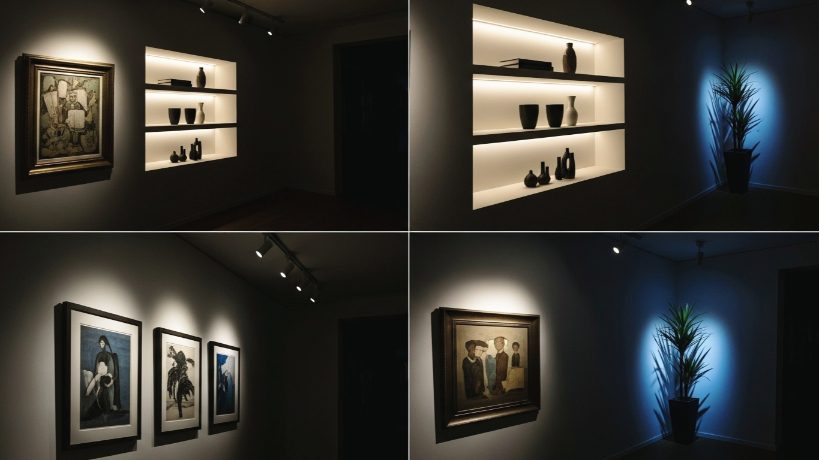
Think of your Hue lights not just as sources of illumination, but as tools for accenting your home’s decor.
- Highlight Artwork: Use a Hue spotlight or the narrow beam of a BR30 bulb to wash a piece of art on your wall with a specific color that complements it.
- Accent Architectural Features: Place a Hue Play light bar or a Bloom table lamp on the floor behind a large plant to uplight it, creating dramatic shadows on the ceiling.
- Create “Color Zones”: In the Hue app, you can create “Zones” that are separate from rooms. Create a “Reading Nook” zone with just one or two lamps. Now you can set the perfect reading light in that corner without affecting the rest of the living room’s ambiance.
My Final Verdict: Play with Your Lights!
A Philips Hue system is a significant investment. You owe it to yourself to use it to its full potential. Don’t let your color bulbs stay on plain white all the time!
Take an hour this weekend to play. Experiment with the scene gallery, try syncing your lights to your favorite album, and build a few holiday themes. You’ll discover a whole new dimension of your smart home—one that’s creative, immersive, and just plain fun.