Smart Home Chaos? Fix It with Aqara U400 & W200
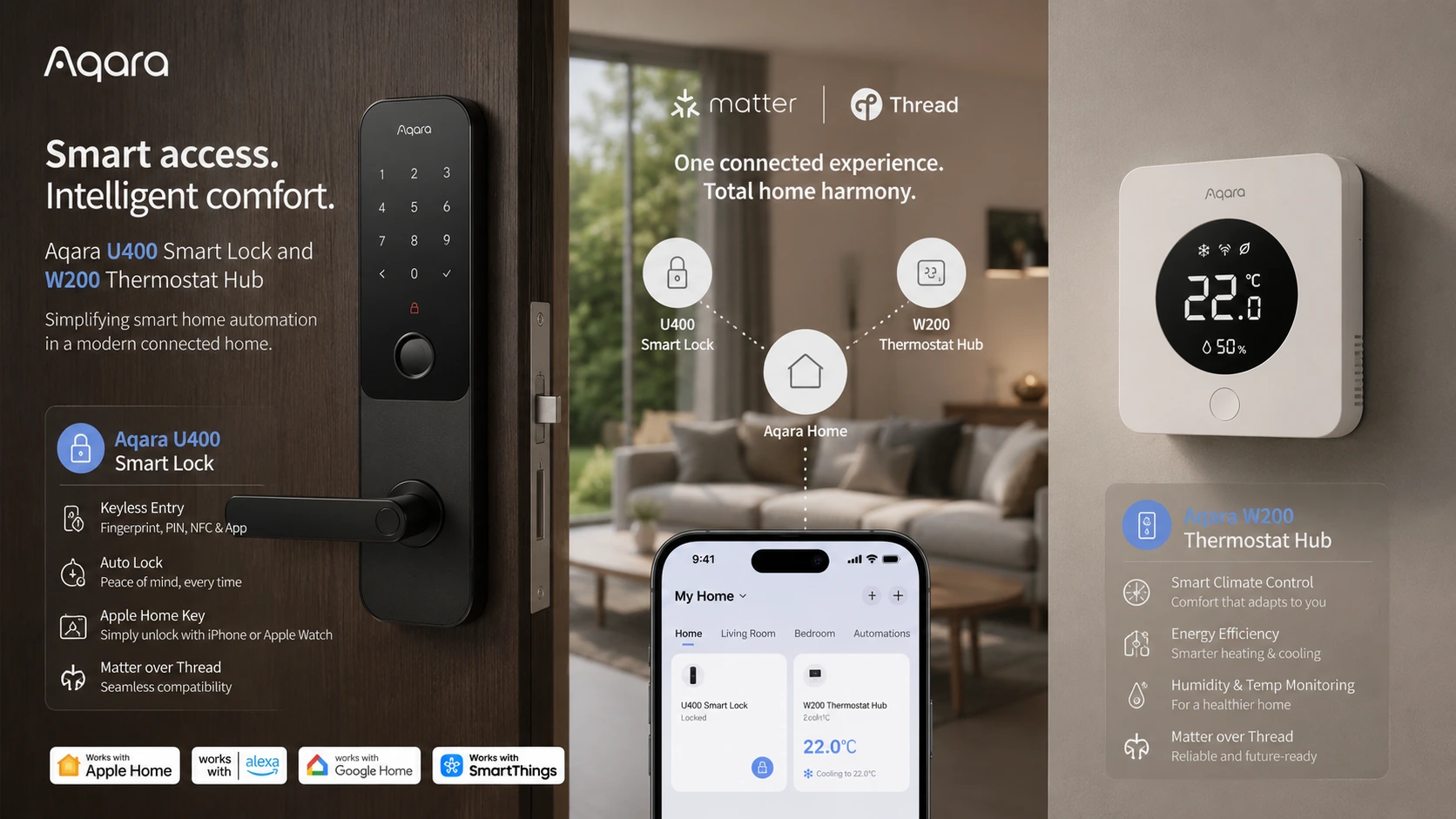
If your smart home feels like a confusing mix of disconnected apps, random hubs, and devices that barely talk to each other, Aqara’s U400 smart lock and W200 thermostat hub aim to solve exactly that problem. Together, they combine secure hands-free door access, intelligent climate automation, and centralized Matter-based smart home control in a much simpler setup.
Smart homes are supposed to make life easier.
But for many people, the opposite happens.
You start with one smart device.
Then another.
Then a video doorbell.
Then a thermostat.
Then a smart lock.
Suddenly your “smart” home feels like a part-time IT job.
Multiple apps.
Multiple hubs.
Confusing automations.
Random compatibility problems.
Notification overload.
That frustration is one of the biggest reasons people abandon smart home upgrades.
Because convenience disappears when complexity takes over.
Aqara’s latest smart home pairing takes a different approach.
Instead of adding more clutter, the Aqara Smart Lock U400 and Aqara Thermostat Hub W200 are designed to simplify the experience.
The idea is refreshingly practical:
- smarter front door access
- centralized smart home control
- intelligent climate automation
- fewer compatibility headaches
- better Matter ecosystem interoperability
The U400 focuses on secure hands-free access using next-generation proximity intelligence.
The W200 acts as a wall-mounted smart control center, thermostat, Matter hub, presence sensor, and automation dashboard.
Together, they solve a real smart home pain point:
too much complexity for too little convenience.
In this review, we’ll break down how both devices work, where they shine, who should buy them, and whether this Aqara setup is actually worth upgrading to.
Why Smart Homes Become So Complicated
Smart homes sound simple in theory.
Buy a few connected devices.
Automate repetitive tasks.
Make life easier.
That’s the promise.
But in reality, many smart homes slowly become messy collections of disconnected gadgets.
And that’s where frustration starts.
1. Too Many Apps
This is one of the biggest pain points.
One brand for your lock.
Another for your thermostat.
Another for cameras.
Another for lights.
Suddenly your phone becomes a smart home control center nobody asked for.
Instead of convenience, you get fragmentation.
2. Multiple Hubs Everywhere
Some ecosystems require their own dedicated hubs.
Others depend on bridges.
Others need specific routers or controllers.
Result?
- more hardware clutter
- more setup complexity
- more compatibility confusion
A “smart” home can quickly start looking messy behind the scenes.
3. Ecosystem Compatibility Problems
This is where beginners get burned.
You buy a great-looking smart lock.
Then realize it doesn’t work smoothly with your preferred ecosystem.
Examples:
- Apple Home conflicts
- Alexa limitations
- Google integration gaps
- Matter support inconsistencies
That creates friction immediately.
4. Automation Fatigue
Automation sounds exciting—until setup becomes exhausting.
Complex automations often require:
- manual rule building
- scene creation
- device linking
- endless troubleshooting
At some point, convenience stops feeling convenient.
5. Security Complexity
Front door access should be simple.
But many smart lock experiences still feel awkward.
Examples:
- open app
- wait for Bluetooth pairing
- hope connection works
- retry if it doesn’t
That’s not seamless access.
6. Smart Home Notification Overload
Another overlooked issue.
Modern smart homes generate endless alerts:
- door opened
- motion detected
- temperature changed
- device offline
- battery warning
Too much noise creates fatigue.
The Real Problem
Most smart homes fail because convenience gets buried under complexity.
That’s the exact problem Aqara appears to be solving.
Instead of adding more disconnected gadgets, the U400 and W200 aim to centralize everyday smart home functions into a cleaner experience.
Let’s look at how that strategy works.
Aqara’s Simplicity Strategy: Why the U400 + W200 Pairing Makes Sense
Many smart home brands solve one problem at a time.
A smart lock here.
A thermostat there.
A separate hub somewhere else.
That approach works—but it often creates the exact fragmentation people hate.
Aqara’s strategy feels smarter.
Instead of treating smart home devices as isolated gadgets, the U400 and W200 are designed as connected parts of a cleaner ecosystem.
One handles access.
One handles environment and control.
Together, they reduce friction.
The U400: Front Door Intelligence
Your front door is one of the highest-friction points in any smart home.
Traditional smart lock experiences can still feel clumsy:
- launch app
- wait for Bluetooth
- tap unlock
- hope connection behaves
The U400 takes a different approach.
Its role is simple:
make entering your home feel effortless and secure.
That means:
- hands-free access
- precise proximity unlocking
- multiple backup entry methods
- Matter-native ecosystem compatibility
This makes the lock feel less like a gadget—and more like invisible convenience.
The W200: Smart Home Command Center
The W200 is much more than a thermostat.
That’s what makes it interesting.
It combines multiple smart home roles into a single wall-mounted device:
- thermostat
- Matter hub
- Zigbee controller
- presence sensor
- security interface
- automation dashboard
Instead of scattered controls, you get a centralized smart home brain.
Why Matter Changes Everything
This is where the pairing becomes much more compelling.
Older smart homes often break because ecosystems don’t cooperate well.
Matter helps solve that.
With Matter-based interoperability, devices work more naturally across platforms like:
- Apple Home
- Alexa
- Google Home
- SmartThings
- Home Assistant
That dramatically reduces ecosystem lock-in.
The Simplicity Advantage
Instead of needing separate hardware for:
- door access
- thermostat control
- automation coordination
- presence awareness
- ecosystem bridging
this setup consolidates multiple roles.
That’s the real value proposition.
Real-World User Experience
Imagine this:
- you approach your front door
- U400 recognizes precise proximity
- door unlocks securely
- W200 detects presence
- temperature adjusts automatically
- smart home routines activate
No app juggling.
No awkward delays.
That’s the kind of smart home experience people actually want.
Bottom Line
Aqara’s U400 + W200 pairing isn’t about adding more smart devices—it’s about removing smart home friction.
Now let’s break down the U400 smart lock in detail.
Aqara Smart Lock U400 Review
If the front door is the most important security point in your smart home, the Aqara Smart Lock U400 is clearly designed to make that experience smarter, faster, and much less frustrating.
And unlike many smart locks that still rely on clunky Bluetooth behavior, Aqara takes a much more advanced route.
The biggest differentiator?
Ultra Wideband (UWB).
Key Specs at a Glance
- Ultra Wideband (UWB) proximity unlocking
- Apple Home Key support
- Apple Wallet integration
- fingerprint scanner
- personal passcodes
- NFC access
- mobile app control
- voice assistant support
- physical backup key
- Matter-certified
- Thread-based connectivity
- IP65 weather resistance
- up to 6-month rechargeable battery life
- auto-lock with built-in gyroscope
What Makes the U400 Different?
Most smart locks still depend on older proximity methods.
That creates familiar annoyances:
- delayed Bluetooth unlocking
- false triggers
- weak distance awareness
- awkward app dependence
The U400 solves this with much more precise location intelligence.
That’s where UWB matters.
What Is Ultra Wideband (UWB)?
Simple explanation:
Bluetooth knows you’re nearby.
UWB knows exactly where you are.
That’s a huge difference.
Ultra Wideband offers centimeter-level location awareness.
It can determine:
- how close you are
- what direction you’re moving
- whether you’re approaching or leaving
- whether you’re inside or outside
This makes smart access dramatically smarter.
Why That Actually Matters
Without precise awareness, smart locks can behave badly.
Examples:
- unlocking while you’re already inside
- triggering unexpectedly in the driveway
- confusing proximity detection
UWB dramatically reduces those mistakes.
That creates a much more natural hands-free experience.
Security Advantages
This isn’t just about convenience.
Precision improves security too.
Benefits include:
- reduced accidental unlocks
- better directional authentication
- much stronger relay attack resistance
That’s a serious upgrade over weaker proximity-based systems.
Apple Home Key Experience
This is one of the strongest selling points for Apple users.
With Apple Home Key support, the U400 works through:
- iPhone
- Apple Watch
- Apple Wallet
No need to launch an app.
No awkward connection dance.
Approach the door and access becomes dramatically smoother.
For HomeKit users, this is a major convenience win.
Multiple Access Methods (Excellent Flexibility)
Not everyone wants one access method.
Aqara gives strong redundancy.
| Access Method | Supported? |
|---|---|
| Ultra Wideband hands-free unlock | Yes |
| Apple Home Key | Yes |
| Fingerprint unlock | Yes |
| Passcode entry | Yes |
| NFC | Yes |
| Mobile app access | Yes |
| Voice assistant commands | Yes |
| Physical backup key | Yes |
This flexibility makes the lock practical for households—not just solo users.
Auto-Lock Intelligence
The built-in gyroscope is another smart touch.
Instead of relying on separate sensors, the lock detects door closure and locks automatically.
That removes another friction point.
Smart Home Compatibility
The U400 is built for modern ecosystems.
Native Matter + Thread support means compatibility with:
- Apple Home
- Alexa
- Google Home
- SmartThings
- Home Assistant
Importantly, no Aqara hub is required for core interoperability.
Durability
- IP65 weather resistance
- rechargeable battery
- up to 6 months per charge
That makes it realistic for everyday use.
Verdict
The Aqara U400 is one of the most compelling smart locks for buyers who want true hands-free access, Apple ecosystem convenience, and modern Matter compatibility without extra ecosystem headaches.
Now let’s look at the device that turns Aqara’s ecosystem into a true smart home control center.
Aqara Thermostat Hub W200 Review
If the U400 makes your front door smarter, the Aqara Thermostat Hub W200 is the device that makes the rest of your smart home feel organized.
And calling it “just a thermostat” would seriously undersell what it does.
This is closer to a wall-mounted smart home control center.
Key Specs at a Glance
- 4-inch full-color touchscreen
- smart thermostat functionality
- Matter hub support
- Thread border router support
- Zigbee hub capabilities
- millimeter-wave presence sensing
- security control panel functions
- smart automation dashboard
- iOS 26 adaptive temperature support
- clean energy optimization features
What Makes the W200 Different?
Traditional thermostats do one job.
Temperature control.
The W200 does much more.
It combines multiple smart home roles into one wall device:
- thermostat
- Matter controller
- Zigbee smart home hub
- presence-aware automation trigger
- security interface
- smart home command dashboard
That consolidation is the real story.
The 4-Inch Touchscreen Advantage
This matters more than it sounds.
Many smart home systems still force users back into smartphone apps.
That creates friction.
The W200 brings control back to the wall—where household interaction feels natural.
Benefits include:
- quick thermostat adjustments
- device monitoring
- automation visibility
- security interactions
- smart home status awareness
For family households, this is especially practical.
iOS 26 Smart Climate Features
This is a major differentiator for Apple users.
The W200 is among the first smart thermostats supporting newer iOS intelligent climate behaviors.
Adaptive Temperature
This feature learns behavioral patterns.
Examples:
- when you’re home
- when you’re sleeping
- when you’re away
Instead of constant manual changes, climate control becomes more autonomous.
That improves both comfort and efficiency.
Clean Energy Guidance
This is especially interesting.
The thermostat can optimize HVAC behavior based on:
- real-time energy pricing
- clean grid availability
- usage efficiency opportunities
That could reduce energy costs while supporting smarter consumption.
What Is Millimeter-Wave Presence Sensing?
This is one of the most advanced features.
And unlike motion detection, presence sensing is much smarter.
Simple explanation:
Motion sensors detect movement.
Presence sensors detect occupancy—even when you’re mostly still.
That’s a huge difference.
Practical use cases:
- screen wakes as you approach
- HVAC reduces when room becomes empty
- automation triggers activate based on real presence
- better energy efficiency
This creates a much more intelligent smart home experience.
Matter Hub Capabilities
This may be the most important technical feature.
The W200 supports both:
- Thread
- Zigbee
And acts as a Matter hub for broader interoperability.
That means it can potentially unify devices across ecosystems instead of forcing fragmented app control.
Supported categories may include:
- lights
- sensors
- switches
- thermostats
- locks
- presence devices
This is what turns the W200 into a smart home infrastructure product—not just HVAC hardware.
Security Panel Potential
Because the device stays visible and accessible on the wall, it naturally doubles as a smart security interaction point.
That improves whole-home usability.
Who Is This Best For?
- Apple smart home users
- Matter adopters
- Aqara ecosystem builders
- smart home simplification seekers
- energy-conscious households
- buyers replacing multiple devices at once
Verdict
The Aqara W200 is far more than a thermostat—it’s one of the most strategically useful smart home consolidation devices in this setup.
Now let’s look at where the real magic happens: how the U400 and W200 work together.
How Aqara U400 + W200 Work Together to Simplify Your Smart Home
Individually, the U400 and W200 are impressive.
Together, they become much more interesting.
Because this is where smart home convenience starts feeling genuinely seamless instead of fragmented.
The biggest advantage isn’t just hardware quality.
It’s workflow simplification.
Scenario 1: Hands-Free Arrival Experience
This is the most obvious smart home win.
Imagine arriving home with:
- groceries in both hands
- your phone in your pocket
- no interest in opening an app
Traditional smart locks often still create friction.
Bluetooth delays.
Manual unlock attempts.
Connection lag.
The U400 changes that.
With Ultra Wideband precision awareness, the lock can understand:
- your distance
- your direction
- whether you’re approaching the door
That creates much smoother access.
Then the W200 can continue the automation chain.
Potential actions:
- detect presence
- wake smart home dashboard
- adjust temperature
- activate home scene automations
This is what “smart” should feel like.
—
Scenario 2: Doorbell + Lock + Wall Control Convenience
This is where the ecosystem gets especially practical.
If paired with an Aqara doorbell, the W200 touchscreen can display visitor snapshots directly on the wall panel.
That removes a major friction point.
Instead of:
- hearing the doorbell
- finding your phone
- opening an app
- checking the camera
- unlocking manually
you can interact from the wall panel itself.
Even better:
unlock the U400 with a single tap directly from the W200 interface.
That feels dramatically cleaner.
—
Scenario 3: Intelligent Climate Automation
Entry events can become automation triggers.
Example:
- door unlocks
- presence confirmed
- W200 shifts HVAC from away mode to comfort mode
No manual thermostat adjustment required.
This improves comfort while reducing repetitive interactions.
—
Scenario 4: Leaving Home Automation
The same logic works in reverse.
When leaving:
- door locks
- presence state changes
- temperature adjusts for efficiency
- selected automations activate
This is where smart home energy optimization becomes useful instead of gimmicky.
—
Scenario 5: Centralized Smart Home Control
Without consolidation, households often manage:
- lock app
- thermostat app
- doorbell app
- automation platform
That gets messy fast.
The W200 reduces this fragmentation by acting as a centralized smart interaction point.
That’s one of its strongest practical advantages.
—
Why This Pairing Works
The U400 solves access friction.
The W200 solves control fragmentation.
Together they reduce smart home chaos.
That’s the real value.
—
Bottom Line
The Aqara U400 + W200 combination works because it connects security, climate control, automation, and household convenience into one smoother ecosystem experience.
Now let’s compare this approach to traditional fragmented smart home setups.
Aqara vs Traditional Smart Home Setups: Which Is Simpler?
Smart homes don’t usually become complicated overnight.
Complexity builds gradually.
One device at a time.
And eventually, what started as convenience becomes digital clutter.
This is where Aqara’s approach looks especially compelling.
The Traditional Smart Home Problem
A typical fragmented smart home often looks like this:
- one app for your smart lock
- another app for your thermostat
- a separate doorbell app
- a dedicated smart hub
- another automation platform
- multiple account logins
On paper, every device is “smart.”
In practice, the experience feels disjointed.
Common Frustrations in Traditional Setups
- Bluetooth smart locks that unlock slowly
- thermostats disconnected from other automations
- compatibility conflicts between ecosystems
- multiple hubs cluttering your network
- family members confused by too many apps
- automation rules breaking unexpectedly
That’s not a smart lifestyle.
That’s maintenance overhead.
—
How Aqara Changes the Experience
The Aqara U400 + W200 pairing takes a much more unified approach.
Instead of scattered device logic, it centralizes core household interactions.
| Traditional Smart Home | Aqara U400 + W200 Approach |
|---|---|
| multiple apps | more centralized interaction |
| separate smart hubs | W200 acts as Matter + Zigbee control center |
| basic Bluetooth lock behavior | UWB precision access |
| manual thermostat interaction | presence-aware intelligent climate automation |
| fragmented ecosystem compatibility | Matter interoperability |
| disconnected household workflows | cross-device automation scenarios |
—
Why Matter Makes a Big Difference
This comparison becomes much stronger because of Matter.
Older smart homes often suffer from ecosystem lock-in.
Meaning:
- Apple-friendly devices may frustrate Alexa users
- Google-first products may limit HomeKit households
- hub dependencies create upgrade headaches
Matter reduces much of that friction.
That’s strategically important.
—
The Household Simplicity Factor
One underrated issue in smart homes:
not everyone in the house wants to learn complicated tech systems.
Family usability matters.
A wall-mounted control interface + easier access workflows make smart homes feel more natural.
That improves adoption dramatically.
—
When Traditional Setups Still Make Sense
To be fair, fragmented setups aren’t always bad.
They may still fit:
- power users who enjoy deep customization
- existing mixed-brand smart homes
- users heavily invested in specific ecosystems
But for convenience-focused households, simplicity usually wins.
—
Bottom Line
Traditional smart homes often optimize for device features. Aqara’s approach optimizes for household usability.
And that’s a meaningful difference.
Now let’s look at who should actually buy this setup.
Who Should Buy the Aqara U400 + W200 Setup?
Not every smart home buyer needs this setup.
And that’s actually a good thing.
The Aqara U400 + W200 combination makes the most sense for specific types of users.
If you fall into one of these groups, the value proposition becomes much stronger.
1. Apple Smart Home Users
This is one of the clearest target audiences.
The U400’s Apple-focused integration is a major advantage.
Features like:
- Apple Home Key
- Apple Wallet access
- Apple Watch unlocking
- iOS adaptive temperature support
make this ecosystem especially attractive for Apple households.
If you already use Apple Home, this setup feels much more natural.
Best fit: iPhone users, Apple Watch users, HomeKit-first smart homes.
—
2. Smart Home Beginners Who Hate Complexity
Many beginners make the same mistake.
They buy disconnected smart gadgets without a long-term ecosystem plan.
That creates chaos quickly.
The Aqara pairing helps avoid that.
Why?
- centralized control
- Matter interoperability
- reduced hub clutter
- fewer fragmented workflows
For beginners, simplicity matters more than maximum customization.
Best fit: first-time smart home builders.
—
3. Matter Ecosystem Adopters
If you care about future-proof smart home compatibility, this setup becomes much more interesting.
Matter support changes the conversation.
Because buyers increasingly want devices that work across ecosystems instead of locking them into one brand.
The U400 + W200 pairing supports that strategy well.
Best fit: interoperability-focused smart home buyers.
—
4. Families Who Want Easier Shared Access
Some smart home products work well for individuals—but poorly for households.
That’s a problem.
The U400’s multiple access methods help a lot here:
- fingerprint
- passcode
- NFC
- Apple devices
- backup physical key
The W200’s wall-mounted interface also improves shared usability.
Not everyone wants to use a phone app for everything.
Best fit: family households, shared homes.
—
5. Energy-Conscious Homeowners
The W200 becomes especially attractive if HVAC efficiency matters.
Its intelligent automation features can potentially help reduce unnecessary heating and cooling usage.
That’s practical value—not just smart home novelty.
Best fit: energy-conscious households, automation-minded homeowners.
—
6. People Upgrading Messy Existing Smart Homes
This may be the strongest use case.
If your current smart home feels chaotic:
- too many apps
- too many disconnected devices
- poor automation coordination
- ecosystem frustration
this pairing becomes much more compelling.
It’s less about adding gadgets—and more about simplifying workflows.
Best fit: smart home cleanup / upgrade users.
—
Who Probably Should Skip This?
This setup may be less compelling for:
- users wanting the absolute cheapest smart devices
- people who prefer simple standalone products
- buyers deeply committed to unrelated ecosystems
- advanced tinkerers who prefer fully custom DIY automation stacks
That doesn’t make Aqara bad.
It just means buyer fit matters.
—
Bottom Line
The Aqara U400 + W200 setup is best for users who value convenience, interoperability, ecosystem simplicity, and smarter household automation—not bargain-basement smart gadgets.
Now let’s look at the honest pros and cons.
Pros and Cons of the Aqara U400 + W200 Setup
No smart home setup is perfect.
And honestly, that’s exactly why balanced evaluation matters.
The Aqara U400 + W200 combination solves several major smart home frustrations—but there are still trade-offs depending on your priorities.
Here’s the realistic breakdown.
What Aqara Gets Right
1. Excellent Smart Home Simplification
This is the biggest win.
Many smart home products add complexity.
This pairing reduces it.
Instead of fragmented experiences, you get more centralized household workflows.
That’s a major usability improvement.
Examples:
- fewer disconnected control points
- less app fragmentation
- cleaner automation logic
—
2. Outstanding Smart Lock Access Flexibility
The U400 is especially strong here.
Multiple entry methods dramatically improve household practicality.
Supported access options include:
- Ultra Wideband hands-free unlock
- Apple Home Key
- Apple Watch
- fingerprint unlock
- passcodes
- NFC
- voice commands
- physical backup key
This makes the lock practical for both tech-savvy users and family households.
—
3. Matter + Thread Future-Proofing
This is strategically important.
Older smart home ecosystems often age badly because compatibility changes.
Matter support improves long-term flexibility.
That reduces ecosystem lock-in risk.
—
4. Strong Apple Ecosystem Experience
Apple users get some of the strongest benefits here.
Examples:
- Apple Home Key convenience
- Wallet integration
- Apple Watch unlock workflows
- iOS climate intelligence features
This pairing feels especially polished inside Apple-centric homes.
—
5. W200 Consolidates Multiple Smart Home Roles
This is arguably the W200’s biggest strength.
Instead of buying separate devices for:
- thermostat control
- Matter hub duties
- Zigbee coordination
- presence sensing
- wall smart home dashboard
the W200 combines those responsibilities.
That reduces clutter and hardware sprawl.
—
6. Better Household Usability
Many smart home systems accidentally optimize for enthusiasts—not families.
A wall interface + flexible access methods improve real-world usability significantly.
—
Potential Downsides
1. Apple Users Benefit Most
This isn’t necessarily a flaw—but it matters.
The most polished experiences clearly favor Apple ecosystem households.
Non-Apple users still benefit—but some standout convenience features feel less compelling.
—
2. Premium Smart Home Pricing
This setup is not bargain-bin smart home hardware.
Buyers seeking the cheapest route may hesitate.
You’re paying for ecosystem convenience—not bare-minimum functionality.
—
3. Matter Still Depends on Ecosystem Maturity
Matter is promising.
But real-world experiences can still vary depending on device compatibility and platform implementation.
That’s an ecosystem reality—not necessarily Aqara’s fault.
—
4. Advanced Features May Be Overkill for Simple Users
Some households simply want:
- a smart lock
- a thermostat
- basic app control
If that’s your use case, advanced automation infrastructure may feel excessive.
—
5. Best Experience Depends on Broader Ecosystem Planning
These products shine most when integrated thoughtfully.
Randomly adding them into messy existing smart homes may reduce some of the simplification benefits.
—
Overall Verdict
The strengths clearly outweigh the downsides—especially for buyers who care about ecosystem simplicity, future compatibility, and smarter household automation.
The biggest question isn’t whether the setup is capable.
It’s whether that level of smart home integration matches your needs.
Now let’s answer the most important commercial question: is it actually worth buying?
Is the Aqara U400 + W200 Setup Worth It?
Short answer?
Yes—if your goal is a smarter, simpler, less fragmented smart home.
But context matters.
This isn’t a setup designed for people who simply want the cheapest smart gadgets available.
It’s designed for buyers who are tired of smart home friction.
What You’re Really Paying For
At first glance, some buyers may focus on hardware pricing alone.
That misses the bigger picture.
Because the real value here isn’t just individual devices.
It’s ecosystem simplification.
You’re paying for:
- hands-free secure home access
- smarter climate automation
- Matter interoperability
- fewer compatibility headaches
- reduced smart home clutter
- centralized household control
- better automation workflows
That changes the buying conversation significantly.
—
Who Gets the Most Value?
This setup makes the most sense for buyers who actively feel smart home frustration today.
Especially:
- Apple smart home users
- Matter-first buyers
- households replacing messy older smart setups
- users wanting fewer apps and cleaner automation
- families needing practical shared usability
For these users, the value proposition is genuinely strong.
—
Where It May Be Overkill
Not everyone needs this level of ecosystem integration.
If your needs are extremely simple:
- basic keypad smart lock
- standard thermostat
- manual HVAC control
- minimal automation
then this pairing may feel excessive.
That’s a legitimate buying consideration.
—
The Biggest Strategic Advantage
Many smart home purchases solve isolated problems.
This setup solves workflow problems.
That’s a much more valuable upgrade.
Examples:
- less app hopping
- less ecosystem confusion
- better household usability
- smarter automation coordination
This is the difference between buying gadgets—and improving your smart home architecture.
—
Best Buying Scenario
The strongest reason to buy this pairing?
You’re already frustrated with a messy smart home.
That’s where Aqara’s value becomes obvious.
Because this isn’t about adding complexity.
It’s about replacing complexity with cleaner workflows.
—
Final Commercial Verdict
The Aqara U400 + W200 combination is one of the most compelling smart home simplification upgrades for users who value ecosystem interoperability, premium convenience, and practical automation.
If your smart home currently feels chaotic, this pairing makes a strong case.
Now let’s finish with quick answers to the most common buyer questions.
Frequently Asked Questions
Does the Aqara U400 require an Aqara hub?
No. The Aqara U400 is Matter-certified and built on Thread, so it can work with compatible ecosystems like Apple Home, Alexa, Google Home, SmartThings, and Home Assistant without requiring a dedicated Aqara hub for core functionality.
What makes the Aqara U400 different from normal smart locks?
The biggest difference is Ultra Wideband (UWB) technology. Unlike traditional Bluetooth proximity unlocking, UWB provides highly accurate location awareness, allowing the lock to detect your exact distance and direction for smoother, more secure hands-free access.
Is the Aqara U400 compatible with Apple Home?
Yes. The U400 strongly supports Apple ecosystem users with Apple Home Key, Apple Wallet integration, and Apple Watch unlocking support.
What does the Aqara W200 actually do?
The W200 is more than a thermostat. It functions as a Matter hub, Zigbee controller, smart home dashboard, presence sensor, security interface, and intelligent climate automation device.
Does the Aqara W200 work with Alexa or Google Home?
Because the W200 supports Matter interoperability, it is designed to integrate more naturally with broader smart home ecosystems including Alexa and Google Home, depending on implementation support.
Is the Aqara U400 + W200 setup good for beginners?
Yes—especially for beginners who want a cleaner ecosystem approach instead of building a fragmented smart home with disconnected devices and multiple apps.
Is this setup worth upgrading to from an older smart home?
If your current smart home feels messy, fragmented, or frustrating to manage, the Aqara U400 + W200 pairing can be a meaningful simplification upgrade.